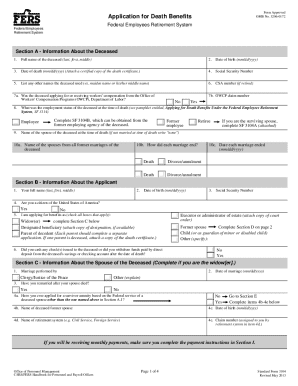
Enefits which may be payable under the Federal Employees Retirement System (FERS) because of the death of an employee, former employee, or retiree who was covered by FERS at the time of his/her death or separation from Federal service. You should have received an informational pamphlet entitled, Applying for Death Benefits Under the Federal Employees Retirement System, SF 3114 with this application. If you did not receive the pamphlet and the deceased was a Federal employee at the time of his/he.
Open form follow the instructions
Easily sign the form with your finger
Send filled & signed form or save
How to fill out the OPM SF 3104 online
The OPM SF 3104 is an essential form for individuals applying for death benefits under the Federal Employees Retirement System due to the passing of a covered employee. This guide provides clear and supportive instructions to help users navigate the online completion of the form.
Follow the steps to successfully complete the form online.
- Click the ‘Get Form’ button to access the OPM SF 3104 and begin filling it out online.
- Start with Section A, which requires information about the deceased, such as their full name, date of birth, and Social Security number. Ensure you have all necessary documents, including a certified death certificate.
- Move to Section B, where you provide information about yourself as the applicant. Include your full name, date of birth, and indicate your relationship to the deceased.
- If you are the spouse of the deceased, complete Section C to provide details about your marriage. Attach copies of your marriage certificate and any divorce decrees if applicable.
- In Section E, list any dependent children of the deceased. Provide their names, dates of birth, and state their relationship to the deceased.
- Section G requires information about the estate of the deceased. Indicate if an executor or administrator has been appointed to settle the estate.
- Be sure to complete Section I for payment instructions regarding how you would like to receive benefits. Choose between direct deposit or a Direct Express debit card.
- Review Section K, the checklist, to ensure all required documents are attached before finalizing your application.
- Once all sections are filled out and reviewed, submit your application as instructed, either online or to the appropriate address.
Complete your OPM SF 3104 application online today to ensure timely processing of your death benefits.
Experience a faster way to fill out and sign forms on the web. Access the most extensive library of templates available.
Related content
This application is for use by persons applying for benefits which may be payable under...
Federal Employees Retirement System. Standard Form 3104. Revised August 2002. Previous...
Get answers to your most pressing questions about US Legal Forms API.
How do I get a SF 50 form for federal employment?
How do I obtain a copy of my SF-50? Visit the National Archives website for information pertaining to replacement of the SF-50 or contact the agency's Human Resources Office where you worked for assistance.
How do I change my federal retirement direct deposit?
Sign in to your online account. Go to OPM Retirement Services Online. Click Direct Deposit in the menu. If you already have direct deposit active, you will see a summary of your account information. Click Change to start a new direct deposit or to change an existing direct deposit.
What is a SF 2801 form?
This pamphlet, along with Standard Form (SF) 2801, Application for Immediate Retirement Under the Civil Service Retirement System, is for you if you are currently a Federal employee covered by the Civil Service Retirement System (CSRS), and you want to apply for retirement with an immediate annuity (annuity beginning ...
How do I get an SF 50 form?
How do I obtain a copy of my SF-50? Visit the National Archives website for information pertaining to replacement of the SF-50 or contact the agency's Human Resources Office where you worked for assistance.
What is SF 75 information?
Use the SF 75 to obtain pre-employment information when the applicant's Official Personnel Folder (OPF) or Merged Records Personnel Folder (MRPF) is not available for review.
What is a sf75 form?
Use the SF 75 to obtain pre-employment information when the applicant's Official Personnel Folder (OPF) or Merged Records Personnel Folder (MRPF) is not available for review. ... The SF 75 may not be used for any other purposes (such as to obtain references or to voucher a prospective employee).
What forms do I need for FERS retirement?
Use form SF 3107, FERS Application for Immediate Retirement, to apply for immediate retirement. You can obtain the form from your employing agency.
What is the number for OPM?
If you have questions regarding your current FEGLI coverage (if any), you must contact your Human Resources Office or local personnel office. Annuitants must contact the OPM Retirement Office at 1-888-767-6738* or send an email to retire@opm.gov.
Where do I send FERS beneficiary forms?
Submit the designation form to: Office of Personnel Management, Retirement Operations Center, P.O. Box 45, Boyers, PA 16017-0045.
Use professional pre-built templates to fill in and sign documents online faster. Get access to thousands of forms.
If you believe that this page should be taken down, please follow our DMCA take down process here.