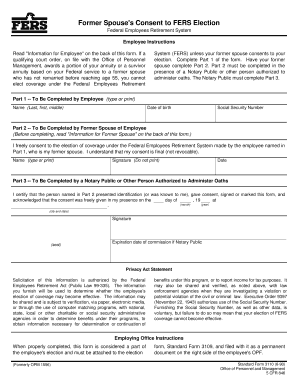
H the Office of Personnel Management, awards a portion of your annuity or a survivor annuity based on your Federal service to a former spouse who has not remarried before reaching age 55, you cannot elect coverage under the Federal Employees Retirement System (FERS) unless your former spouse consents to your election. Complete Part 1 of the form. Have your former spouse complete Part 2. Part 2 must be completed in the presence of a Notary Public or other person authorized to administer oaths. T.

How it works
  • Open form

    Open form follow the instructions

  • Easily sign form

    Easily sign the form with your finger

  • Share form

    Send filled & signed form or save

How to fill out the OPM SF 3110 online

Filling out the OPM SF 3110 form is an essential step for employees who seek to elect coverage under the Federal Employees Retirement System while ensuring the consent of their former spouse when required. This guide provides clear, step-by-step instructions to help you complete the form accurately and efficiently.

Follow the steps to complete the OPM SF 3110 form online.

  1. Press the ‘Get Form’ button to obtain the form and open it in your online editor.
  2. Complete Part 1 of the form, which includes entering your name (last, first, middle), date of birth, and Social Security Number. Ensure all information is accurate and legible.
  3. Proceed to Part 2, where your former spouse must provide their information, including their name, signature, and date. It is crucial that they complete this section in the presence of a Notary Public or an authorized person who can administer oaths.
  4. Instruct the Notary Public to complete Part 3. This section requires the Notary to certify that your former spouse presented their identification, consented, and signed the form in their presence.
  5. After all parts of the form are filled out and signed, review the form for completeness and accuracy. Save the changes you made online.
  6. You can now download, print, or share the completed form as necessary, ensuring it is properly filed as part of your election documents.

Complete your OPM SF 3110 form online today to ensure a smooth election process.

Get form

Experience a faster way to fill out and sign forms on the web. Access the most extensive library of templates available.

Related content

SF 3110 Former Spouse's Consent to Fers Election...

I freely consent to the election of coverage under the Federal Employees Retirement System...

Learn more
Printing C:\MYFILES\FORMS\SF3111~1\SF_3111X.FRF...

After OPM returns form with Section 5 completed. Attach one copy of this request form to...

Learn more
Modulation Envelop. - US Navy Radio Communications

cuit is used !opmduce 10W6 high-level piute mdolatiw at ... put of a conventional s-f...

Learn more
Questions & Answers

Get answers to your most pressing questions about US Legal Forms API.

Contact support

How long does it take OPM to process my retirement 2020?

How long will it take to process my federal retirement application? It takes around 60 days (2 months) to process applications for common cases. Your application could take longer if: We need additional information from you or your former employing agency.

This pamphlet, along with Standard Form (SF) 2801, Application for Immediate Retirement Under the Civil Service Retirement System, is for you if you are currently a Federal employee covered by the Civil Service Retirement System (CSRS), and you want to apply for retirement with an immediate annuity (annuity beginning ...

Use the SF 75 to obtain pre-employment information when the applicant's Official Personnel Folder (OPF) or Merged Records Personnel Folder (MRPF) is not available for review. ... The SF 75 may not be used for any other purposes (such as to obtain references or to voucher a prospective employee).

Sign in to your online account. Go to OPM Retirement Services Online. Click Direct Deposit in the menu. If you already have direct deposit active, you will see a summary of your account information. Click Change to start a new direct deposit or to change an existing direct deposit.

Submit the designation form to: Office of Personnel Management, Retirement Operations Center, P.O. Box 45, Boyers, PA 16017-0045.

How Long Before I Get My First Retirement Check? In my experience, most Federal Employees will not receive their first retirement check until 3 months after they retire.

Use form SF 3107, FERS Application for Immediate Retirement, to apply for immediate retirement. You can obtain the form from your employing agency.

To be vested (eligible to receive your retirement benefits from the Basic Benefit plan if you leave Federal service before retiring), you must have at least 5 years of creditable civilian service. Survivor and disability benefits are available after 18 months of civilian service.

Most FERS employees pay 0.8% of basic pay for FERS basic benefits. The agency contributes 10.7% or more to FERS. The FERS basic benefit provides retirement, disability, and survivor benefits and may be reduced for early retirement or to provide survivor protection.

If you have questions regarding your current FEGLI coverage (if any), you must contact your Human Resources Office or local personnel office. Annuitants must contact the OPM Retirement Office at 1-888-767-6738* or send an email to retire@opm.gov.

Get This Form Now!

Use professional pre-built templates to fill in and sign documents online faster. Get access to thousands of forms.

If you believe that this page should be taken down, please follow our DMCA take down process here.

Get OPM SF 3110