Loading
Get Canada Ddpcp Sample: Preparing For My Health Care Visit 2019-2026
How it works
-

Open form follow the instructions
-

Easily sign the form with your finger
-

Send filled & signed form or save
How to fill out the Canada DDPCP Sample: Preparing For My Health Care Visit online
Filling out the Canada DDPCP Sample: Preparing For My Health Care Visit form is an essential step in ensuring that you are prepared for your health care visit. This guide will walk you through each section of the form, providing clear instructions and helpful tips to enhance your experience.
Follow the steps to successfully complete the form online.
- Press the ‘Get Form’ button to access the form and open it in the editor.
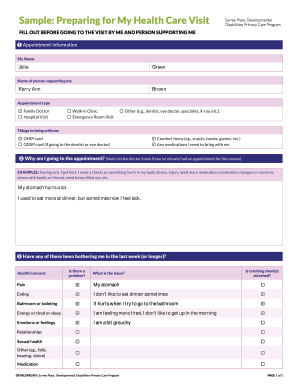
- Begin with the appointment information section. Fill in 'My Name' with your first and last name. Next, enter the name of the person who will be supporting you during the visit. Choose the appropriate appointment type from the list provided, such as 'Family Doctor,' 'Hospital Visit,' or any other relevant options.
- In the 'Things to bring with me' section, list all necessary items including your OHIP card, ODSP card (if applicable), comfort items like snacks or books, and any medications you need to bring.
- Explain the purpose of your appointment in the section titled 'Why am I going to the appointment?'. Provide a brief statement detailing your health concerns, such as discomfort or any specific ailments.
- Address any health concerns that have been affecting you recently in the designated section. Check all that apply to you, providing details for each issue mentioned.
- Continue filling out the 'During My Health Care Visit' section. Summarize the appointment details by documenting what was discussed and any procedures performed. If necessary, attach a copy of additional notes or documents.
- Record any medication changes or new medications that were prescribed by the health care provider.
- In the 'Things to remember to do before I leave' section, ensure that you jot down all reminders, including scheduling upcoming appointments and confirming any referrals.
- Lastly, complete the 'After My Health Care Visit' section by providing comments on your visit, describing how it went and any follow-up actions needed.
- Once all sections are filled out accurately, save your changes. You can then download, print, or share the completed form as needed.
Complete your forms online to ensure a smooth health care visit.