Loading
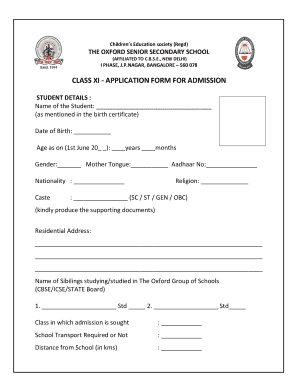
Get Class Xi - The Oxford Senior Secondary School
How it works
-

Open form follow the instructions
-

Easily sign the form with your finger
-

Send filled & signed form or save
How to fill out the Class XI - The Oxford Senior Secondary School online
Filling out the Class XI application form online for The Oxford Senior Secondary School is a straightforward process. This guide provides a detailed, step-by-step approach to ensure you complete the form accurately and efficiently.
Follow the steps to successfully complete the application form.
- Press the ‘Get Form’ button to access the application form and open it in your preferred digital editor.
- In the 'Student Details' section, input the student's name as it appears on the birth certificate, followed by the date of birth, and age on June 1 of the relevant year. Fill in the gender, mother tongue, Aadhaar number, nationality, and caste details.
- Provide the residential address of the student in the designated field. Include any pertinent details for clarity.
- List any siblings who are currently enrolled or have previously attended The Oxford Group of Schools, along with their respective class levels.
- Indicate the class for which admission is sought and specify whether school transport is required. Additionally, provide the distance from home to school in kilometers.
- In the 'Family Details' section, enter details for the father, mother, and guardian separately. Input their names, educational qualifications, occupation, designation, organizational name, annual income, PAN number, Aadhaar number, telephone numbers, mobile numbers, and email addresses.
- In the 'Academic Details' section, list all previous schools attended, including the city or country, classes, academic years, and percentage of marks obtained.
- Fill in the courses offered based on the stream of study preferred—either Science or Commerce. Choose the subjects accordingly.
- Provide any relevant information in the 'Personality and Health' section, concerning your child's special personality traits or health issues requiring attention.
- In the 'Declaration' section, confirm the correctness of the information provided by signing and dating the form. Ensure all parties (father, mother, guardian) sign where applicable.
- Complete the checklist for enclosures, ensuring to attach the required documents such as previous class marks cards, proof of address, and identification documents as specified.
- Once all sections are filled out and reviewed, save your changes. You may choose to download, print, or share the completed application form as needed.
Take the next step towards your child's education by completing the application form online today!
SSC stands for Secondary School Certificate (Class 10th), and HSC stands for Higher Secondary Certificate (Class12th)
Industry-leading security and compliance
US Legal Forms protects your data by complying with industry-specific security standards.
-
In businnes since 199725+ years providing professional legal documents.
-
Accredited businessGuarantees that a business meets BBB accreditation standards in the US and Canada.
-
Secured by BraintreeValidated Level 1 PCI DSS compliant payment gateway that accepts most major credit and debit card brands from across the globe.