Get Puea Online Registration
How it works
-

Open form follow the instructions
-

Easily sign the form with your finger
-

Send filled & signed form or save
How to fill out the Puea Online Registration online
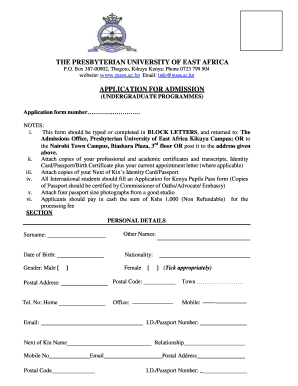
Filling out the Puea Online Registration form is an essential step in applying for undergraduate programs at the Presbyterian University of East Africa. This guide provides clear, step-by-step instructions to assist you in completing the form effectively.
Follow the steps to complete your application successfully.
- Press the ‘Get Form’ button to access the Puea Online Registration form and open it in your preferred document editor.
- Begin by providing your personal details, including your surname, other names, date of birth, nationality, and gender. Ensure that all information is accurate and complete.
- Fill in your contact information, which includes your postal address, postal code, town, and telephone numbers (home, office, and mobile). Additionally, provide your email address and identification number (I.D./Passport Number).
- Next, provide details of your next of kin, including their name, mobile number, relationship to you, email, and postal address. Also, include their I.D./Passport number.
- Select the type of admission you are seeking. Tick the appropriate boxes for the campus you wish to attend (Main Campus or Town Campus) and the mode of study (Full-Time, Part-Time, Open and Distance Learning, or School-based Learning).
- Indicate your preferred semester intake by ticking the box for January/April, May/August, or September/December.
- Fill out the section regarding the programme you are applying for by ticking the relevant options for Undergraduate Degree, Certificate, Diploma Course, Short Course, or Pre-University. Specify your 1st and 2nd choice of programmes.
- In the academic history section, list the names of schools, colleges, or universities you have attended, along with the dates attended, grades attained, and years of graduation.
- Provide reference information by obtaining a reference letter from a person who knows you personally and is not a relative. Fill in the name and title of your referee along with their address, postal code, and telephone number.
- Complete the declaration to certify that the information you have provided is correct. Sign in the designated area.
- Once you have completed all sections, review the form for accuracy. Make any necessary corrections before proceeding to save your changes, or you may download, print, or share the form as required.
Start your Puea Online Registration today and take the first step toward your academic journey!
a) Documents Required for Application & Registration Passport photo - a clear passport sized photo is required(accepted types: jpeg,png,jpg) Scanned National ID - applies to only Kenyan applicants who are above 18 years of age. Scanned Birth Certificate - applies to only Kenyan applicants who are below 18 years of age. Presbyterian University of East Africa: Online Application Portal PUEA Website http://onlineapp.puea.ac.ke PUEA Website http://onlineapp.puea.ac.ke