Loading
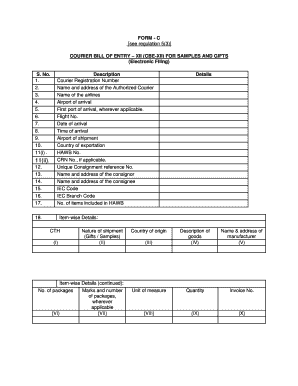
Get Form - C See Regulation 5(3) Courier Bill Of Entry ? Xii ...
How it works
-

Open form follow the instructions
-

Easily sign the form with your finger
-

Send filled & signed form or save
How to fill out the FORM - C See Regulation 5(3) COURIER BILL OF ENTRY ? XII online
Filling out the FORM - C See Regulation 5(3) Courier Bill of Entry is essential for processing samples and gifts through courier services. This guide provides users with a clear and comprehensive approach to submitting this form online, ensuring compliance with regulatory requirements.
Follow the steps to fill out the FORM - C See Regulation 5(3) Courier Bill of Entry online.
- To begin the process, click the 'Get Form' button to access the form and open it in your online document tool.
- Complete the courier registration number in the appropriate field.
- Enter the name and address of the authorized courier responsible for the shipment.
- Provide the name of the airline transporting the goods.
- Specify the airport of arrival for the consignment.
- If applicable, indicate the first port of arrival.
- Input the flight number associated with the shipment.
- Record the date on which the shipment arrives.
- Fill in the time of arrival for the consignment.
- Mention the airport of shipment from which the goods originated.
- Indicate the country from which the goods are being exported.
- Enter the House Air Waybill (HAWB) number for tracking purposes.
- If applicable, include the Courier Registration Number (CRN).
- Provide a unique consignment reference number to identify the shipment.
- Fill out the name and address of the consignor sending the goods.
- Complete the name and address of the consignee who will receive the shipment.
- Enter the Import Export Code (IEC) of the consignee.
- If relevant, provide the IEC branch code.
- State the number of items included in the HAWB.
- For item-wise details, indicate the Customs Tariff Head (CTH) and nature of the shipment, categorizing it as gifts or samples.
- Continue with item-wise details by indicating the number of packages, including any applicable marks and numbers.
- List the country of origin for each item.
- Provide a detailed description of the goods.
- Enter the name and address of the manufacturer for the items.
- Select the unit of measure that applies to the quantity of items.
- State the quantity of goods included.
- Fill in the invoice number associated with the items.
- Provide the invoice value for each item.
- Indicate the invoice rate of currency exchange used.
- Calculate and input the assessable value in Indian Rupees, according to the relevant section of the Customs Act.
- Address any notifications related to the consignment including notification type and corresponding numbers.
- In the declaration section, confirm that authorization from the consignee or consignor has been obtained.
- Verify that the goods listed in this Bill of Entry include only lawful commercial samples and gifts.
- Mention the number of Airway bills and invoices attached to the submission.
- Conclude by ensuring the details provided are complete, correct, and true.
- Finally, you may save changes, download, print, or share the form as needed.
Start filling out your FORM - C online today for efficient processing.
The BOE and a shipping bill are vital documents that traders file when moving goods across the border. However, there is one primary difference between the two. An importer files a BOE when importing goods into a country, while an exporter files a shipping bill when exporting goods outside a country.
Industry-leading security and compliance
US Legal Forms protects your data by complying with industry-specific security standards.
-
In businnes since 199725+ years providing professional legal documents.
-
Accredited businessGuarantees that a business meets BBB accreditation standards in the US and Canada.
-
Secured by BraintreeValidated Level 1 PCI DSS compliant payment gateway that accepts most major credit and debit card brands from across the globe.