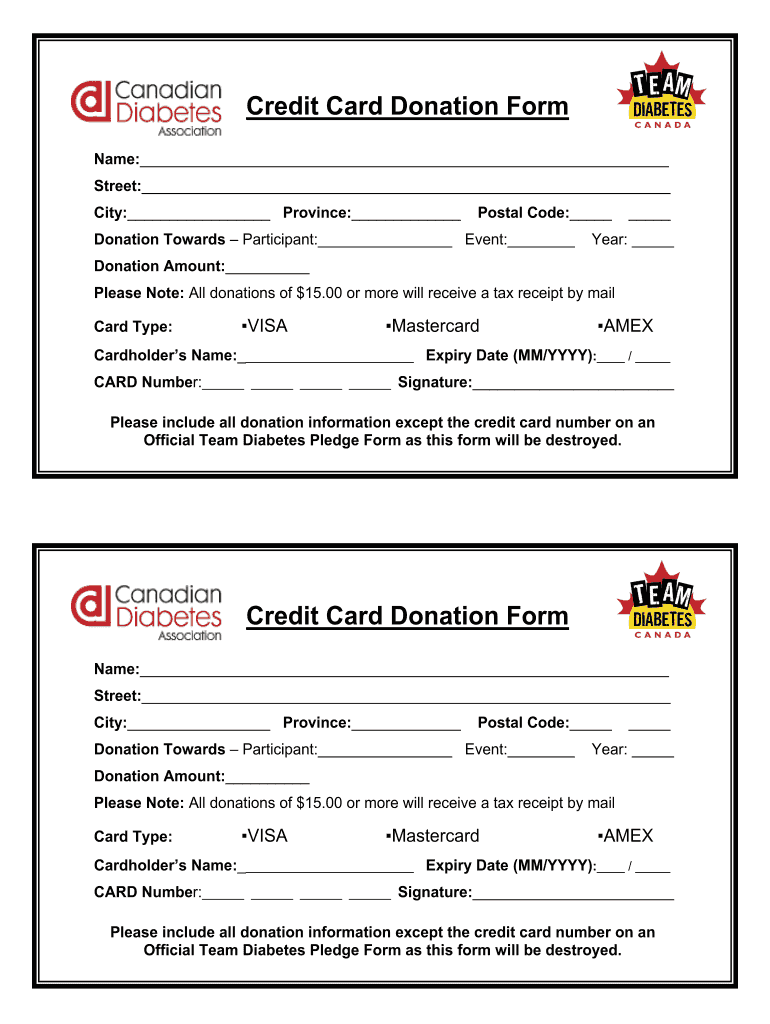
Credit Card Donation Form Name: Street: City: Province: Postal Code: Donation Towards ? Participant: Event: Year: Donation Amount: Please Note: All donations of $15.00 or more will receive a tax receipt.
Loading

Open form follow the instructions

Easily sign the form with your finger

Send filled & signed form or save
How to fill out the Card For Donations online
This guide provides detailed instructions to help you complete the Card For Donations form online. By following the steps outlined below, you can ensure that all necessary information is accurately submitted.
Follow the steps to fill out the form correctly.
- Press the ‘Get Form’ button to access the Card For Donations form and open it in your preferred document editor.
- Begin filling in your personal details. In the 'Name' section, enter your full name. Next, input your 'Street' address, followed by your 'City' and 'Province'. Finally, provide your 'Postal Code'.
- Specify the purpose of your donation. In the 'Donation Towards' section, enter the name of the participant and the corresponding event. Make sure to include the 'Year' of the event.
- Indicate the 'Donation Amount' you wish to contribute. Remember that donations of $15.00 or more will receive a tax receipt by mail.
- Choose the card type by selecting either VISA, Mastercard, or AMEX.
- Fill in the 'Cardholder’s Name' as it appears on the card. Enter the 'Expiry Date' in the format of MM/YYYY.
- Input your 'Card Number' in the designated spaces, ensuring accuracy to avoid transaction issues.
- Sign the form in the 'Signature' section to authorize the donation.
- Please ensure to include all donation information except the credit card number on an Official Team Diabetes Pledge Form, as this form will be destroyed for security purposes.
- Once all information is correctly entered, you can save your changes, download the filled form, print a copy, or share it as needed.
Now that you have the guidance to fill out the Card For Donations, complete your form online.
Experience a faster way to fill out and sign forms on the web. Access the most extensive library of templates available.
Related content
Steps you can take before donating to make sure you're not giving money to a fake ... It's...
I would like to make a tax deductible donation to CARD-USF's Autism Services Fund at USF...
May 26, 2016 — How does donating work? What are the benefits? Why should I give my cards...
Get answers to your most pressing questions about US Legal Forms API.
What is a good donation message?
I'm writing to ask you to support me and my [cause/project/etc.]. Just a small donation of [amount] can help me [accomplish task/reach a goal/etc.] Your donation will go toward [describe exactly what the contribution will be used for]. [When possible, add a personal connection to tie the donor to the cause.
How do you say donate in a nice way?
Ditch "Donate" When Choosing Wording For Donations This might surprise you, but the word "donate" kills the donation vibes. Instead, choose words like partner, give, and support. "Donate" gives the impression that you only want (or need) their money.
What do you say when giving donations?
'As a gesture of goodwill, I made a donation in your name to X Charity. ' Most people understand the importance of giving back. If this sounds like your recipient, let them know you've made this kind gift in their name to a worthy organization.
What is a nice message for donations?
Generic donation thank you quotes “Thank you for your donation. ... “We know you have a lot of choices when it comes to donating, and we are so grateful that you chose to donate to our cause. ... “We have a lot of work to do, and your generous donation helps us get that important work done.”
How do you write a donation appreciation message?
Generic donation thank you quotes “Thank you for your donation. ... “We know you have a lot of choices when it comes to donating, and we are so grateful that you chose to donate to our cause. ... “We have a lot of work to do, and your generous donation helps us get that important work done.”
How do you express gratitude for donations?
15 creative ways to say “thank you” to your donors Send a handwritten letter. ... Make the phone call. ... Organize an office tour. ... Highlight donors on social media and website. ... Send small gifts. ... Send a welcome package. ... Send birthday/anniversary cards. ... Send a “thank you” video.
What is a letter for proof of donation?
A donation acknowledgment letter is a type of donor letter that you send to donors to document their charitable gifts and donations. Sometimes your donation receipt functions as a donor acknowledgement. However, that's not always the case. All donors deserve to be thanked, no matter the size of their gift.
What do you write in a card for donations?
'A Donation Has Been Made in Your Name' Wording for a Card 'A donation has been made in your name to X Charity. ... 'As a gesture of goodwill, I made a donation in your name to X Charity. ... 'To honor your love and support, I made a donation in your honor to X Charity. ... 'A heartfelt donation was made in your honor to X Charity.
Use professional pre-built templates to fill in and sign documents online faster. Get access to thousands of forms.
If you believe that this page should be taken down, please follow our DMCA take down process here.