Loading
Get Gsa 1600 2011-2026
How it works
-

Open form follow the instructions
-

Easily sign the form with your finger
-

Send filled & signed form or save
How to fill out the GSA 1600 online
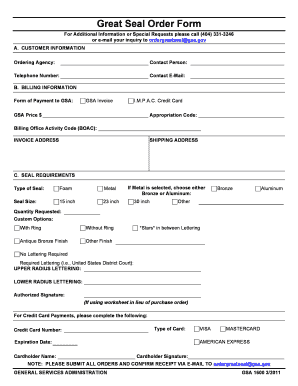
The GSA 1600 form is essential for ordering the Great Seal. This guide will provide you with clear instructions on how to complete the form online, ensuring that you include all necessary information accurately.
Follow the steps to fill out the GSA 1600 online effectively.
- Press the ‘Get Form’ button to access the GSA 1600 form and open it in the editing interface.
- In the customer information section, enter the name of your ordering agency, the contact person's name, their telephone number, and email address.
- Proceed to the billing information section. Indicate the form of payment you will be using, such as a GSA invoice or I.M.P.A.C. credit card. Specify the GSA price and provide the appropriation code and Billing Office Activity Code (BOAC) if applicable.
- Fill out the invoice address and shipping address sections with the appropriate details.
- In the seal requirements section, select the type of seal you are ordering (Foam or Metal) and the size of the seal you wish to request. If you chose Metal, indicate if you prefer Bronze or Aluminum. Specify the quantity requested.
- If you have custom options, select any desired preferences such as with or without a ring, antique bronze finish, or other finishes. Indicate if you require stars in between lettering or if no lettering is required. If required, fill in the required lettering fields for upper and lower radius lettering.
- If you are making a credit card payment, provide the credit card number, specify the type of card, expiration date, cardholder name, and cardholder signature.
- Review all the information you have entered to ensure its accuracy. Once you have confirmed the details, you can save changes, download, print, or share the completed form.
Complete your GSA 1600 form online today to ensure your Great Seal order is processed smoothly.