Loading
Form preview
  • US Legal Forms
  • Form Library
  • Tax Forms
  • Executive Department Treasury IRS Forms
  • Dhs G-884 2016

Get Dhs G-884 2016

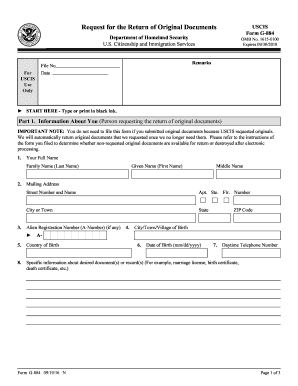
Remarks File No Date START HERE - Type or print in black ink. Part 1. Information About You (Person requesting the return of original documents) IMPORTANT NOTE: You do not need to file this form if you submitted original documents because USCIS requested originals. We will automatically return original documents that we requested once we no longer need them. Please refer to the instructions of the form you filed to determine whether non-requested original documents are available for retu.

How it works

  1. Open form

    Open form follow the instructions

  2. Easily sign form

    Easily sign the form with your finger

  3. Share form

    Send filled & signed form or save

How to fill out the DHS G-884 online

Filling out the DHS G-884 form, also known as the Request for the Return of Original Documents, is a crucial step for individuals who wish to retrieve original documents submitted to USCIS. This guide will provide you with clear, step-by-step instructions to help you complete the form accurately and efficiently.

Follow the steps to complete the DHS G-884 form online.

  1. Click ‘Get Form’ button to obtain the form and open it for editing.
  2. Begin with Part 1 by entering your full name. Specify your family name (last name), given name (first name), and middle name as applicable. Next, provide your mailing address, including street number and name, apartment/ste./floor number, city or town, state, and ZIP code.
  3. Enter your Alien Registration Number (A-Number) if you have one. Fill in your place of birth, including the city/town/village and country of birth. Complete the date of birth in the format mm/dd/yyyy and provide your daytime telephone number.
  4. Proceed to Part 2 to provide data for identification of the personal record. Enter the subject's full name, along with any other names used, date of birth, and place of birth details including city, state, and country.
  5. Add details about the subject's entry into the United States, including the date of entry, type of entry (e.g., visitor, student), port-of-entry, and A-Number if applicable.
  6. In the U.S. Citizenship Information section, provide the name on the certificate of naturalization, its number, and date. Repeat the process for the certificate of citizenship details if relevant.
  7. In Part 3, certify your identity by signing the form. Ensure your signature is notarized, and do not sign until you are before the certifying official.
  8. Complete the date of the signature and provide the certifying official's information, including their printed name, title, and signature. Ensure the date is accurately completed.
  9. Once all sections are filled out, review your entries for accuracy. Save the changes to your form. You may have options to download, print, or share the completed form as needed.

Complete your DHS G-884 form online today to ensure the safe return of your original documents.

Get form

Experience a faster way to fill out and sign forms on the web. Access the most extensive library of templates available.

Related content

G-884 | Request for the Return of Original...
Sep 5, 2024 — Use this form to request that USCIS return original documents that you...
Learn more
Form G-639, Freedom of Information/Privacy Act...
Nov 3, 2022 — Return of Original Documents. Use Form G-884, Request for the Return of...
Learn more
PR-SC5530
About the Basic Manual. This unit works as an AV controller when connected with a...
Learn more

Related links form

SC DoR C-278 2017 SC DoR C-278 2009 SC DoR C-278 2008 SC DoR C-278 2002

Questions & Answers

Get answers to your most pressing questions about US Legal Forms API.

Contact support

Filing online can often be quicker and more efficient compared to submitting paper forms for your DHS G-884. Online submissions usually receive immediate updates and confirmations, which can streamline the process. However, some applicants prefer paper forms due to their familiarity with traditional methods. Assess your comfort level with technology before making your decision.

To submit form G-884, complete the form following USCIS instructions, and ensure you have all required supporting documents. You can mail the form to the designated address provided in the instructions or opt for online submission, depending on USCIS's current offerings. The uslegalforms platform simplifies this task, offering templates and advice to help you through every step.

When submitting the DHS G-884, it is crucial to send only copies of your documents, not the originals. Sending original documents can complicate your application and delay your response from USCIS. If you use uslegalforms, you will receive guidance on what documents to include and how to prepare your submission correctly.

To submit the DHS G-884, complete the form accurately and gather all necessary supporting documents. You can mail your completed form to the address provided by USCIS or submit it online if that option is available. Utilizing the uslegalforms platform can streamline your process, as it guides you through the submission requirements and necessary steps.

You should send your travel document form, including the DHS G-884, to the address specified in the instructions provided with your form. Ensure you check the latest mailing instructions on the USCIS website to avoid any delays. If you use the uslegalforms platform, you can find accurate information about where to send your forms.

Choosing between online or mail filing depends on your personal preferences and situation. Online filing offers speed and efficiency, while mail can provide a sense of security in having physical copies of your application and documents. When using forms such as the DHS G-884, ensure you choose the method that suits your needs best.

Filing online with USCIS can simplify the process and provide immediate acknowledgment of your application. It allows you to upload necessary documents like the DHS G-884 directly, making it more convenient. Additionally, online applications may also have shorter processing times compared to paper submissions.

Filing with USCIS online often leads to quicker processing times and allows for easier tracking of your application status. Additionally, online systems may streamline your submission of forms such as the DHS G-884. However, some individuals may prefer mail for its physical records and personal touch, so consider your comfort level.

The best way to send USCIS documents is through a reliable mailing service that provides tracking capabilities. This ensures your documents arrive safely and allows you to monitor their progress. Be sure to include the DHS G-884 when necessary, as it may be an important part of your submission.

To submit documents to USCIS by mail, ensure you are using the correct address designated for your application type. It is vital to include all required forms, including the DHS G-884 if relevant, and any supporting documents. Using a secure mailing option will help you track your submission and confirm its delivery.

Get This Form Now!

Use professional pre-built templates to fill in and sign documents online faster. Get access to thousands of forms.
If you believe that this page should be taken down, please follow our DMCA take down processhere.
Get DHS G-884
  • Adoption
  • Bankruptcy
  • Contractors
  • Divorce
  • Home Sales
  • Employment
  • Identity Theft
  • Incorporation
  • Landlord Tenant
  • Living Trust
  • Name Change
  • Personal Planning
  • Small Business
  • Wills & Estates
  • Packages A-Z
  • Affidavits
  • Bankruptcy
  • Bill of Sale
  • Corporate - LLC
  • Divorce
  • Employment
  • Identity Theft
  • Internet Technology
  • Landlord Tenant
  • Living Wills
  • Name Change
  • Power of Attorney
  • Real Estate
  • Small Estates
  • Wills
  • All Forms
  • Forms A-Z
  • Form Library
  • Legal Hub
  • About Us
  • Help Portal
  • Legal Resources
  • Blog
  • Affiliates
  • Contact Us
  • Delete My Account
  • Site Map
  • Industries
  • Forms in Spanish
  • Localized Forms
  • State-specific Forms
  • Forms Kit
  • Real Estate Handbook
  • All Guides
  • Notarize
  • Incorporation services
  • For Consumers
  • For Small Business
  • For Attorneys
  • USLegal
  • FormsPass
  • pdfFiller
  • signNow
  • altaFlow
  • DocHub
  • Instapage
Form Packages
  • Adoption
  • Bankruptcy
  • Contractors
  • Divorce
  • Home Sales
  • Employment
  • Identity Theft
  • Incorporation
  • Landlord Tenant
  • Living Trust
  • Name Change
  • Personal Planning
  • Small Business
  • Wills & Estates
  • Packages A-Z
Form Categories
  • Affidavits
  • Bankruptcy
  • Bill of Sale
  • Corporate - LLC
  • Divorce
  • Employment
  • Identity Theft
  • Internet Technology
  • Landlord Tenant
  • Living Wills
  • Name Change
  • Power of Attorney
  • Real Estate
  • Small Estates
  • Wills
  • All Forms
  • Forms A-Z
  • Form Library
Customer Service
  • Legal Hub
  • About Us
  • Help Portal
  • Legal Resources
  • Blog
  • Affiliates
  • Contact Us
  • Delete My Account
  • Site Map
  • Industries
  • Forms in Spanish
  • Localized Forms
  • State-specific Forms
  • Forms Kit
Legal Guides
  • Real Estate Handbook
  • All Guides
Prepared for you
  • Notarize
  • Incorporation services
Our Customers
  • For Consumers
  • For Small Business
  • For Attorneys
Our Sites
  • USLegal
  • FormsPass
  • pdfFiller
  • signNow
  • altaFlow
  • DocHub
  • Instapage
Social Media
Call us now toll free:
+1 833 426 79 33
As seen in:
© Copyright 1999-2026 airSlate Legal Forms, Inc. 3720 Flowood Dr, Flowood, Mississippi 39232
  • Your Privacy Choices
  • Terms of Service
  • Privacy Notice
  • Content Takedown Policy
  • Bug Bounty Program
DHS G-884
This form is available in several versions.
Select the version you need from the drop-down list below.
2021 DHS G-884
Select form
  • 2021 DHS G-884
  • 2016 DHS G-884
  • 2011 DHS G-884
Select form