Loading
Get Gsa 1655 2019-2026
How it works
-

Open form follow the instructions
-

Easily sign the form with your finger
-

Send filled & signed form or save
How to fill out the GSA 1655 online
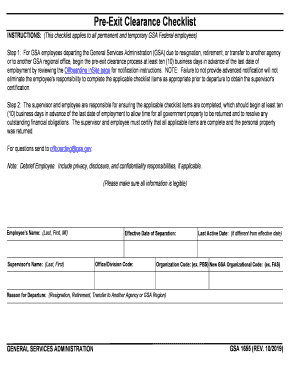
The GSA 1655 form is essential for GSA employees undergoing the pre-exit clearance process. This guide provides step-by-step instructions to help users complete the form online with ease.
Follow the steps to complete the GSA 1655 form online.
- Click ‘Get Form’ button to obtain the form and access it in the online editor.
- Begin filling in the employee's name (Last, First, MI) in the designated field.
- Input the supervisor's name (Last, First) in the required section.
- Specify the effective date of separation, which is crucial for processing.
- Enter the office/division code to categorize the employee's department.
- If applicable, note the last active date, especially if different from the effective date.
- Provide the organization code, such as PBS or FAS, to identify the operational unit.
- Select the reason for departure from the options provided: resignation, retirement, transfer to another agency, or GSA region.
- Review each item on the checklist, marking them as completed where applicable, and including initials and dates.
- In the additional information section, provide justifications for any items that were not resolved before the departure date.
- Certify by signing the form as the employee and providing the date.
- Ensure the supervisor or designated person signs the form and includes the date.
- Once all fields are completed, save your changes, and you may opt to download, print, or share the form based on your needs.
Start filling out your GSA 1655 form online today to ensure a smooth transition.
Employee Exit refers to the process of separation of an employee from the service of an organization. This can be on account of voluntary resignation, termination, end of contract, retirement, death or absconding. As part of the exit, the company performs a no-due clearance and processes the final settlement.