Loading
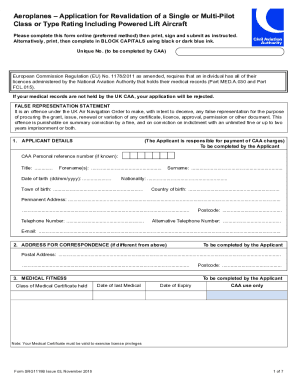
Get Uk Srg 1119b 2018-2026
How it works
-

Open form follow the instructions
-

Easily sign the form with your finger
-

Send filled & signed form or save
How to fill out the UK SRG 1119B online
The UK SRG 1119B form is essential for individuals applying for the revalidation of their aviation licenses. This guide aims to provide a clear, step-by-step approach to filling out the form online, ensuring you submit accurate information for a smooth application process.
Follow the steps to complete the UK SRG 1119B online application form.
- Press the ‘Get Form’ button to access the UK SRG 1119B form online. This action allows you to open the form in the editor for completion.
- Begin by entering your personal details in the 'Applicant Details' section. Provide your CAA personal reference number, title, forename(s), date of birth, surname, nationality, town and country of birth, permanent address, telephone number, postcode, alternative telephone number, and email address.
- If the correspondence address differs from your permanent address, complete the 'Address for Correspondence' section with the appropriate postal address.
- In the 'Medical Fitness' section, enter the class of medical certificate you hold, along with the postcode, date of your last medical exam, and the expiry date of your medical certificate.
- Detail your UK or non-UK licenses held under the 'Particulars of UK or Non-UK Licences Held' section, including the issuing authority, type/class of license, and license number.
- List your ratings held in the 'Ratings Held' section. Specify the date of your most recent skill test or revalidation for each type and/or class rating, along with the expiry date of each rating.
- In the 'Application' section, tick the appropriate boxes to indicate what you are applying for, and provide additional requested details such as total flight time in the preceding 12 months.
- Complete the 'Confirmation of Proficiency Check' section by entering the date of your proficiency check and the aircraft type and registration.
- Sign and date the 'Declaration of Applicant' section, confirming that all information provided is correct and that you have reviewed the necessary guidance notes.
- Submit your application by ensuring all sections are completed, then save your changes. You can download or print the form for your records or to submit by mail.
Complete your UK SRG 1119B application online today for a streamlined process.
Revalidation or Renewal? First of all, let's explain the terminology: Revalidation (of a licence, rating or certificate) – this is the process taken if your licence or rating has not expired. Renewal (of a licence, rating or certificate) – the process required if your licence or rating has expired.