Loading
Get Al 25a-312 2012-2026
How it works
-

Open form follow the instructions
-

Easily sign the form with your finger
-

Send filled & signed form or save
How to fill out the AL 25A-312 online
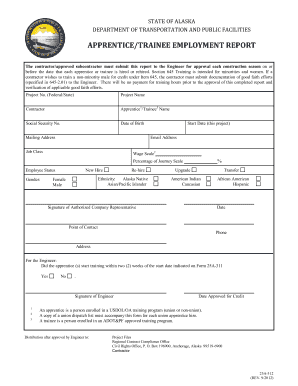
This guide provides clear and comprehensive instructions on filling out the AL 25A-312 form, known as the Apprentice/Trainee Employment Report. It aims to support users in submitting this essential document accurately and efficiently.
Follow the steps to complete the AL 25A-312 form online.
- Press the ‘Get Form’ button to access the AL 25A-312 form online.
- Fill in the project number (Federal/State). Ensure this number matches the project being reported.
- Enter the project name for accurate identification.
- Input the contractor's name to indicate the responsible entity for the project.
- Provide the apprentice or trainee's full name, ensuring it matches their identification documents.
- List the social security number of the apprentice or trainee for verification purposes.
- Input the date of birth for the apprentice or trainee to confirm eligibility.
- Fill in the mailing address where correspondence regarding this report should be sent.
- Specify the start date of employment for the apprentice or trainee on this project.
- Include an email address for direct communication regarding the training status.
- Indicate the job class associated with the apprentice or trainee's role.
- Specify the wage scale applicable to the apprentice or trainee.
- Enter the percentage of the journey scale that applies to the trainee.
- Select the employee status, whether this is a new hire, re-hire, upgrade, or transfer.
- Choose the appropriate gender option for the apprentice or trainee.
- Select the ethnicity of the apprentice or trainee from the provided options.
- The authorized company representative must sign and date the form to validate the information provided.
- Input the point of contact's name and phone number to facilitate communication.
- Complete the section for the engineer, confirming whether training began within two weeks of the indicated start date.
- Ensure that the engineer signs and dates the form to finalize approval for credit.
- Once all fields are completed, you can save changes, download, print, or share the form as needed.
Complete your AL 25A-312 form online today to ensure compliance and support your apprentice or trainee's employment.