Loading
Get Ca Ftb 590-p 2018
How it works
-

Open form follow the instructions
-

Easily sign the form with your finger
-

Send filled & signed form or save
How to fill out the CA FTB 590-P online
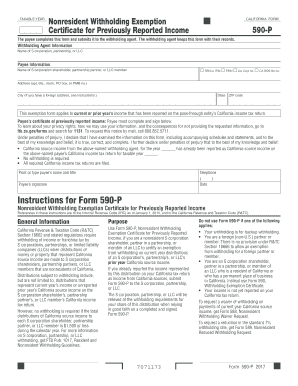
This guide provides comprehensive instructions on completing the CA FTB 590-P form online, designed for individuals who need to certify an exemption from withholding on previously reported income. Follow these steps to efficiently fill out the form and ensure compliance with California tax guidelines.
Follow the steps to complete the CA FTB 590-P online.
- Click the ‘Get Form’ button to access the CA FTB 590-P form and open it in your preferred editor.
- Enter the current year in the designated box at the top of the form.
- Provide the withholding agent's name, which could be an S corporation, partnership, or LLC.
- Enter the payee's information, including their name, and check the appropriate box corresponding to their taxpayer identification number (SSN, ITIN, FEIN, CA Corp no., or CA SOS file no.).
- Input the full address of the payee, including any apartment or suite numbers, city, state, and ZIP code.
- Ensure that you sign the payee’s certification by entering your name, title, telephone number, and the date.
- After completing the form, ensure all accuracy, save your changes, and choose to download, print, or share the completed document as needed.
Complete your CA FTB 590-P form online today for a smooth and efficient process.
Get form
Experience a faster way to fill out and sign forms on the web. Access the most extensive library of templates available.
California's e-filing requirement mandates that certain taxpayers must file their returns electronically. Generally, this applies to those who have income that meets specific thresholds. It is recommended to stay updated with the CA FTB 590-P guidelines to avoid any compliance issues.
Get This Form Now!
Use professional pre-built templates to fill in and sign documents online faster. Get access to thousands of forms.