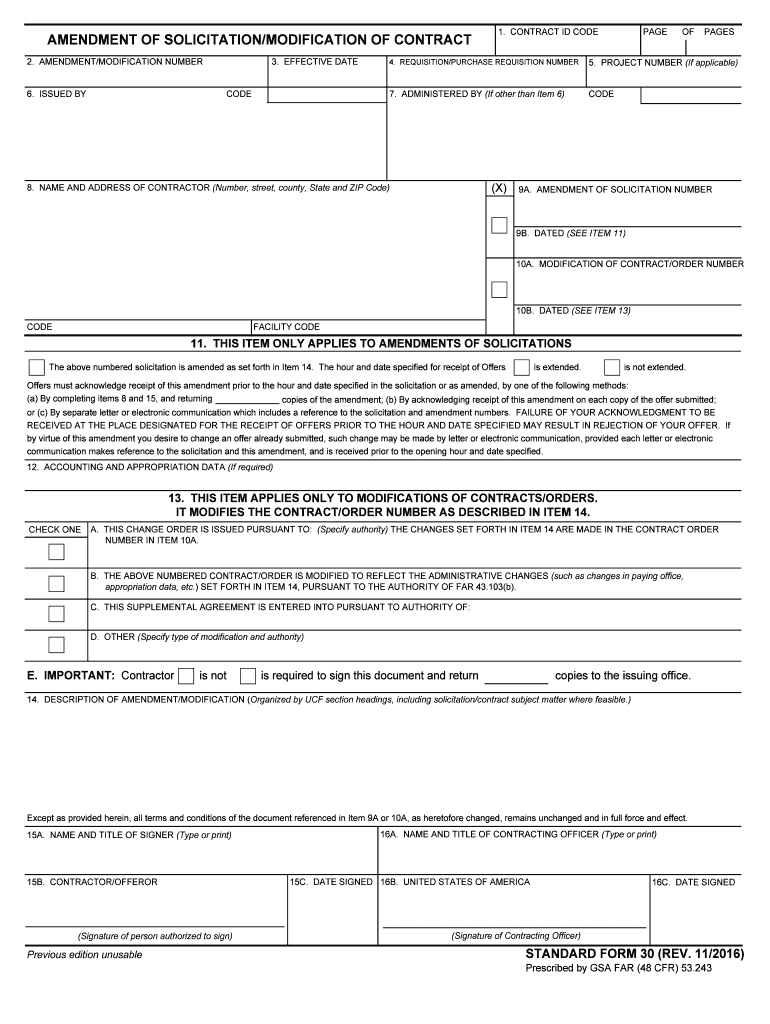
ER 5. PROJECT NUMBER (If applicable) 7. ADMINISTERED BY (If other than Item 6) CODE (X) 8. NAME AND ADDRESS OF CONTRACTOR (Number, street, county, State and ZIP Code) 9A. AMENDMENT OF SOLICITATION NUMBER 9B. DATED (SEE ITEM 11) 10A. MODIFICATION OF CONTRACT/ORDER NUMBER 10B. DATED (SEE ITEM 13) CODE FACILITY CODE 11. THIS ITEM ONLY APPLIES TO AMENDMENTS OF SOLICITATIONS The above numbered solicitation is amended as set forth in Item 14. The hour and date specified for receipt of Offers.
Loading

Open form follow the instructions

Easily sign the form with your finger

Send filled & signed form or save
How to fill out the GSA SF30 online
Filling out the GSA SF30 form, also known as the amendment of solicitation or modification of contract, can be a straightforward process when approached step-by-step. This guide is designed to help users effectively complete the form online, ensuring all necessary information is accurately captured.
Follow the steps to successfully complete the GSA SF30 form.
- Click the ‘Get Form’ button to obtain the form and open it for online completion.
- In the first section, enter the contract ID code that appears in the title block of the contract being modified in Item 1.
- Complete Item 2 by entering the amendment or modification number assigned to this document.
- Indicate the effective date in Item 3, which is typically the issue date of the amendment or change.
- Provide the requisition or purchase requisition number in Item 4, if applicable.
- If there is a project number associated with this modification, enter it in Item 5.
- Fill in Item 6 with the name and address of the office that issued the amendment, along with the code, if necessary.
- In Item 8, enter the name and address of the contractor as it appears in the original contract, including their code.
- Move to Items 9A and 9B to indicate the amendment of solicitation number and date, using the original solicitation's information.
- Complete Items 10A and 10B with the modification of contract/order number and date.
- In Item 11, specify whether the time for receipt of offers is extended or not, and include details as required.
- If required, fill in Item 12 with relevant accounting and appropriation data.
- For Item 13, check the appropriate box regarding the type of modification, and specify the associated authority.
- Describe the details of the amendment or modification in Item 14 using clear and organized headings.
- In Item 15A, type or print the name and title of the signer for the contractor, and ensure they sign in Item 15B.
- In Item 16A, enter the contracting officer's name and title, and ensure they sign in Item 16C as required.
- Once all sections are completed, users can save changes, download the document, print it, or share it as needed.
Complete your GSA SF30 form online with ease and ensure all requirements are met.
Experience a faster way to fill out and sign forms on the web. Access the most extensive library of templates available.
Related content
Form: SF30. Amendment of Solicitation/Modification of Contract. Current Revision Date:...
SF 30 (11/2016), Amendment of Solicitation/Modification of Contract. SF 30 is prescribed...
They do NOT include adding clauses, or making “no-cost” changes to a contract. When...
Get answers to your most pressing questions about US Legal Forms API.
What does GSA stand for in business?
A general security agreement (GSA) represents a special agreement that allows you to secure a commercial business loan with certain types of collateral. If you default on the loan, your creditor may reclaim the asset noted in the security agreement as repayment.
Which are the most risky contracts?
Cost Plus (CP) contracts are most risky for the buyers and Fixed Price (FP) contracts are most risky for the sellers.
What is a standard form 30?
Standard Form 30 - Amendment of Solicitation/Modification of Contract.
Which is the least preferred contract type?
The T&M contract type is the least preferred because it is the hardest to manage for both Government and contractor.
Which contract type is least risky for contractor?
Cost Reimbursable Contracts The project uses a cost reimbursable contract to pay the contractor for allowable expenses related to performing the work. Since the cost of the project is reimbursable, the contractor has much less risk associated with cost increases.
What is a form sf30?
SF 30 is prescribed for use in amending invitation for bids, as specified in 14.208 ; modifying purchase and delivery orders, as specified in 13.302-3 ; and modifying contracts, as specified in 42.1203(h), 43.301 , 49.602-5 , and elsewhere in this regulation.
What are the 4 types of contracts?
Contract Types Comparison Party 1 offersUnit priceA service + the cost of one unitBilateralServices or goods that are of value to the other partyUnilateralServices or goods that the other party requested, usually in an open requestImpliedServices or goods9 more rows • 26 Jan 2022
Which contract is the least risky for owners?
Fixed Price Contracts The seller and the buyer agree on a fixed price for the project. The seller often accepts a high level of risk in this type of contract. The buyer is in the least risk category since the price the seller agreed to is fixed.
Use professional pre-built templates to fill in and sign documents online faster. Get access to thousands of forms.
If you believe that this page should be taken down, please follow our DMCA take down process here.