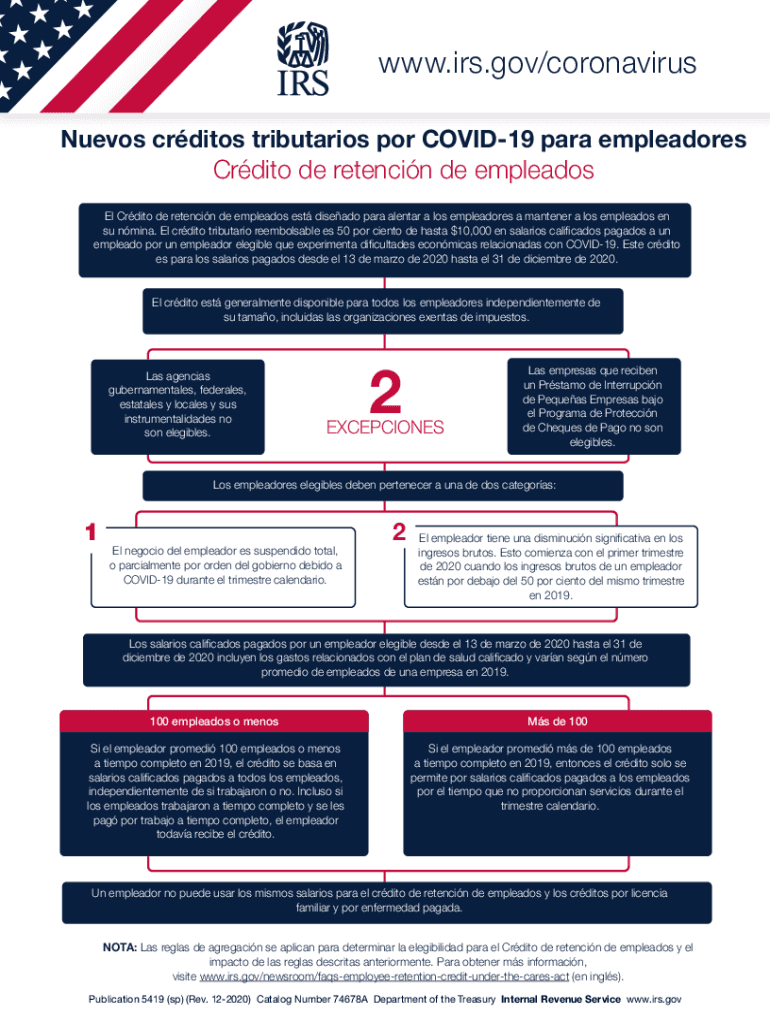
Pleadores a mantener a los empleados en su n mina. El cr dito tributario reembolsable es 50 por ciento de hasta $10,000 en salarios calificados pagados a un empleado por un empleador elegible que experimenta dificultades econ micas relacionadas con COVID-19. Este cr dito es para los salarios pagados desde el 13 de marzo de 2020 hasta el 31 de diciembre de 2020. El cr dito est generalmente disponible para todos los empleadores independientemente de su tama o, incluidas las organizaciones.
Loading

Open form follow the instructions

Easily sign the form with your finger

Send filled & signed form or save
How to fill out the IRS Publication 5419 (SP) online
Filling out the IRS Publication 5419 (SP) form online can seem daunting, but this guide aims to break down the process into manageable steps. Understanding the requirements for various credits can help employers effectively contribute to their workforce during challenging times.
Follow the steps to complete the IRS Publication 5419 (SP) form online.
- Click the ‘Get Form’ button to obtain the IRS Publication 5419 (SP) and open it in your preferred editor.
- Review the introductory section of the form to understand the eligibility requirements for the employee retention credit.
- In section 1, fill out your business information, including your employer identification number (EIN) and contact details.
- Navigate to the section that addresses the employee retention credit. Carefully read through the criteria to determine your eligibility based on business suspension or decline in revenue.
- Complete section 2 by entering the qualified wages paid to employees during the specified timeframe, including health plan expenses.
- If you are applying for sick leave and family leave credits, ensure you accurately fill out the relevant subsections, including details on eligible employees and their qualifying circumstances.
- Review all sections for accuracy and completeness, ensuring that all qualifying credits are documented properly.
- Once you have filled out the form, you can save your changes, download, print, or share the completed IRS Publication 5419 (SP) as needed.
Take action today and complete your tax-related documents online.
Experience a faster way to fill out and sign forms on the web. Access the most extensive library of templates available.
Related content
Publication 5419 (sp) (Rev. 12-2020) Catalog Number 74678A Department of the Treasury...
May 24, 2010 — It is the policy of the Service to publish in the Bulletin all sub...
Check out www.irs.gov and click on “1040 Central” for the tax forms, information,...
Get answers to your most pressing questions about US Legal Forms API.
Where can I get a copy of IRS Publication 17?
To get a copy, visit the IRS web site at .irs.gov under the “Forms and Pubs” section. It can be accessed directly at ftp.fedworld.gov/pub/irs- pdf/p17. pdf. Or it can be ordered by calling 1-800-829-3676.
What is the substantial presence test for Firpta?
The substantial presence test that requires a person be physically present in the United States for a certain number of days a year. 183 days (pursuant to IRS Code).
How many tax publications are there?
There are over 800 various forms and schedules. Other tax forms in the United States are filed with state and local governments.
What is pub 596 earned income credit eic?
For the latest information about developments related to Pub. 596, such as legislation enacted after it was published, go to IRS.gov/Pub596. What Is the EIC? The EIC is a tax credit for certain people who work and have earned income under $59,187. A tax credit usually means more money in your pocket.
How do I view my IRS documents online?
You can access your federal tax account through a secure login at IRS.gov/account. View the amount you owe, along with details of your balance, your payment history, tax records, and key tax return information from your most recent tax return as originally filed.
How do I find IRS publications?
Personal computer users may download forms and publications from the IRS Web site at .irs.gov/forms_pubs/index.html. This site also has links to state tax forms and to forms that you can fill in online and then print.
What is the presence test under immigration laws?
If you are not a U.S. Citizen, and you were physically present in the U.S. for at least 31 days in 2022 and cumulative (total) of 183 days for the years 2020, 2021, and 2022, you are likely a resident for tax purposes. If you were not present for this total of days, you are likely a non-resident for tax purposes.
What are publications from the IRS?
IRS publications are informational booklets written by the Internal Revenue Service that give taxpayers detailed guidance on tax issues.
Use professional pre-built templates to fill in and sign documents online faster. Get access to thousands of forms.
If you believe that this page should be taken down, please follow our DMCA take down process here.