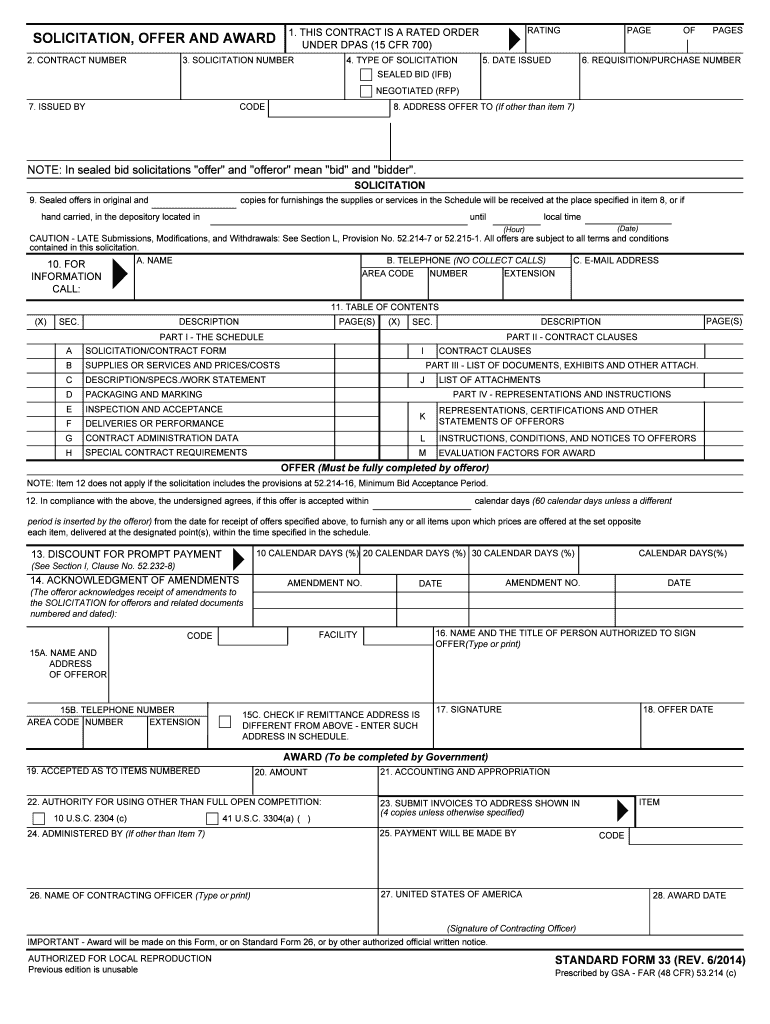
QUISITION/PURCHASE NUMBER SEALED BID (IFB) NEGOTIATED (RFP) 7. ISSUED BY CODE 8. ADDRESS OFFER TO (If other than item 7) NOTE: In sealed bid solicitations "offer" and "offeror" mean "bid" and "bidder". SOLICITATION 9. Sealed offers in original and copies for furnishings the supplies or services in the Schedule will be received at the place specified in item 8, or if hand carried, in the depository located in until local time (Date) (Hour) CAUTION - LATE Submissions, Modifications, and.
Loading

Open form follow the instructions

Easily sign the form with your finger

Send filled & signed form or save
How to fill out the GSA SF 33 online
The GSA SF 33 is a crucial document used in federal procurement processes, serving as the solicitation, offer, and award form. This guide will walk you through filling out this form online, ensuring you understand each component and can complete it accurately.
Follow the steps to complete the GSA SF 33 form online successfully
- Press the ‘Get Form’ button to obtain the GSA SF 33 form and open it in your editor.
- Fill in the contract number in section 2, ensuring it matches any referencing documentation.
- Indicate whether this contract is a rated order under the Defense Production Act (DPA) in section 1.
- Provide the solicitation number in section 3 to identify your submission.
- Select the type of solicitation from options in section 4, such as sealed bid or negotiated.
- Insert the date issued in section 5 to record when the solicitation is open.
- In section 6, enter the requisition or purchase number associated with this solicitation.
- Complete section 7 with the name and code of the entity issuing the solicitation.
- If applicable, list the address to which offers should be submitted in section 8.
- Follow instructions in section 9 for submitting sealed offers, noting the deadline for submission.
- Provide contact information, including name, telephone number, and email address in sections 10 A, B, and C.
- Review the table of contents in section 11 to ensure all required sections are included.
- Complete section 12, confirming your compliance with the request and specifying the acceptance period.
- Enter any discounts for prompt payment in section 13, if applicable.
- Acknowledge any amendments to the solicitation in section 14 by entering amendment numbers and dates.
- Fill in the name and address of the offeror in section 15, as well as contact information.
- Sign the document in section 17 and include the date of the offer in section 18.
- Complete sections 19 to 28 as required, if you are authorized to accept contracts.
- Once all fields are completed, save changes, and consider downloading or printing the form for your records.
Complete your documents online now to ensure timely submissions!
Experience a faster way to fill out and sign forms on the web. Access the most extensive library of templates available.
Related content
Form: SF33. Solicitation, Offer, and Award. Current Revision Date: 06/2014. Authority or...
AWARD DATE. CODE. ITEM. STANDARD FORM 33 (REV,. 9-97). Prescribed by GSA - Far (48 CFR)...
Global Services Agreement (GSA) · GSA Service Terms · Service Terms for ... Dublin: 33...
Get answers to your most pressing questions about US Legal Forms API.
What does GSA mean in contracting?
The GSA Schedule, also known as Federal Supply Schedule, and Multiple Award Schedule (MAS), is a long-term governmentwide contract with commercial companies that provide access to millions of commercial products and services at fair and reasonable prices to the government.
What is the role of the GSA?
GSA provides workplaces by constructing, managing, and preserving government buildings and by leasing and managing commercial real estate. GSA's acquisition solutions offer private sector professional services, equipment, supplies, and IT to government organizations and the military.
What is SF 18?
(a) SF 18 (Rev. 6/95), Request for Quotations, or SF 1449 (Rev. Nov 2021), Solicitation/Contract/Order for Commercial Products and Commercial Services. SF 18 is prescribed for use in obtaining price, cost, delivery, and related information from suppliers as specified in 13.307(b).
What does GSA stand for in business?
A general security agreement (GSA) represents a special agreement that allows you to secure a commercial business loan with certain types of collateral. If you default on the loan, your creditor may reclaim the asset noted in the security agreement as repayment.
What is a solicitation package?
Solicitation Package means the materials contained in the written Solicitation including the Ballot, Voting Instructions, a pre-addressed postage paid envelope, and the Disclosure Statement with all Exhibits, including the Plan.
What does GSA stand for?
GSA U.S. General Services Administration.
Use professional pre-built templates to fill in and sign documents online faster. Get access to thousands of forms.
If you believe that this page should be taken down, please follow our DMCA take down process here.