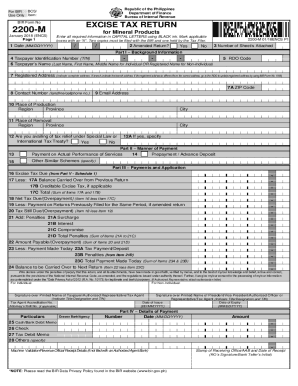
Republic of the Philippines Department of Finance Bureau of Internal RevenueBCS/ For BIR Use Only Item: BIR Form NoEXCISE TAX RETURN2200Mfor Mineral ProductsJanuary 2018 (ENCS) Page 1Enter all required.
Open form follow the instructions
Easily sign the form with your finger
Send filled & signed form or save
How to fill out the PH BIR Form 2200-M online
This guide provides detailed instructions for users on how to fill out the PH BIR Form 2200-M, which is the Excise Tax Return for Mineral Products. Completing this form online can ensure a smoother filing process and help reduce errors in your tax submissions.
Follow the steps to fill out the form accurately and efficiently.
- Press the ‘Get Form’ button to access the document and open it in the editing interface.
- Fill in the background information section. Enter your Taxpayer Identification Number (TIN), the taxpayer's name, RDO code, registered address, and contact information. Ensure all information is accurate and complete.
- Indicate if this is an amended return by selecting 'Yes' or 'No'.
- Specify the place of production and place of removal, including region, province, and city.
- If applicable, indicate whether you are availing of tax relief under special law or an international tax treaty.
- Complete Part II by selecting the manner of payment. Choose among actual performance of services, prepayment, or other similar schemes.
- In Part III, input the amounts related to Excise Tax due and any other credits or payments carried over from previous returns.
- Calculate the tax still due or any overpayment. Include penalties if they apply.
- Sign the declaration under penalties of perjury, ensuring to provide your printed name and the necessary details if you are an authorized representative.
- Finally, review all entries for accuracy, then save your changes, download, print, or share the completed form as necessary.
Start completing your PH BIR Form 2200-M online today!
Experience a faster way to fill out and sign forms on the web. Access the most extensive library of templates available.
Related content
Jan 22, 2020 — 2200, Office of Manufacturing, TEXTILE MILL PRODUCTS. 2211, Office of...
Refers to the version of the BIR forms developed and maintained by the BIR for ... b...
Byblos is a city in the Mount Lebanon Governorate of Lebanon. It is believed to have been...
Get answers to your most pressing questions about US Legal Forms API.
How do you create an employee Alphalist?
Go to Payroll Tab. Click on Reports Under Forms, click on View Input the Date Period you want to generate. Under Form, select the BIR Alphalist version you want to generate. Then click on Continue ... You will receive an email, the file that is ready to download. Congratulations!
How do I submit to Alphalist?
Mandatory Electronic Submission Through electronic submission using the BIR website address at esubmission@bir.gov.ph, and. Through electronic mail (email) at dedicated BIR address using prescribed CSV data file format, the details of which shall be issued in separate revenue issuance.
Who needs to file 1601c?
1601C - Guidelines and Instructions. This return shall be filed in triplicate by every withholding agent (WA)/payor who is either an individual or non-individual, required to deduct and withhold taxes on compensation paid to employees.
How can I get my tin number online 2020?
Visit the BIR eReg website either using your computer or phone. Carefully fill the online form and submit. Wait for the confirmation message from BIR.
What is the use of BIR Form 1600?
1600 (Remittance Return of VAT and Other Percentage Taxes Withheld) notwithstanding the quarterly filing of percentage tax returns. Also, BIR Form No. 1600 shall still be used for VAT withheld on government money payments and payments to non-residents.
What is MC in Bir?
VALUE-ADDED TAX. WG. WITHHOLDING TAX - VAT AND OTHER. MC. MISCELLANEOUS TAX.
How do I apply for eBIRForms online?
Step 1: Access BIR website at www.bir.gov.ph using your internet browser. Step 2: Click eServices. Step 3: Click either eFPS or eBIRForms Step 4: From the Login page, click on 'Enroll to eFPS or eBIRForms' Step 5: The eFPS or eBIRForms online enrollment form appears.
How do I download eBIRForms?
Simply go to https://www.bir.gov.ph/ and click the To download Offline eBIRForms Package v7 link in order for you to download the eBIRForms package. The application will be downloaded in the form of a . zip file.
What is BIR Form 1604 CF?
BIR form 1604-CF is the Annual Information Return of Income Taxes Withheld on Compensation and Final Withholding Taxes. ... Under Action,click Generate Form. The editable 1604-CF form will pop up.
How do I download eBIRForms offline?
You have to go to https://www.bir.gov.ph/ and proceed by clicking the To download Offline eBIRForms Package v7. 2 link. Once downloaded, you willl receive a zip file that you'll need to extract by right clicking on the file and selecting Extract Here.
Use professional pre-built templates to fill in and sign documents online faster. Get access to thousands of forms.
If you believe that this page should be taken down, please follow our DMCA take down process here.