Loading
Get Juvenile Community Service Form - Chambers County
How it works
-

Open form follow the instructions
-

Easily sign the form with your finger
-

Send filled & signed form or save
How to fill out the Juvenile Community Service Form - Chambers County online
Filling out the Juvenile Community Service Form for Chambers County is a straightforward process that can be completed online. This guide provides clear instructions to help users navigate the form effectively and ensure all necessary information is provided.
Follow the steps to complete your form accurately
- Click ‘Get Form’ button to access the Juvenile Community Service Form, which you will open in a suitable online editor.
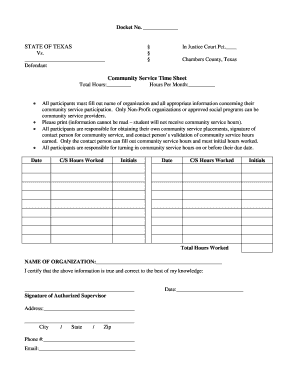
- Begin by entering the docket number at the top of the form. This number is essential for identifying your case within the justice system.
- Fill in the name of the defendant. This is the individual participating in community service.
- Next, indicate the precinct number in which your case is being handled. This is found adjacent to the Justice Court label.
- Provide the details of the community service organization. Specifically, write the name of the organization where the community service will be undertaken.
- Record the total hours worked on the form. Ensure to fill this field accurately, as it will validate your community service.
- Details regarding community service participation, such as date and hours per month, should be documented here. Use clear and legible writing; illegible information will not be accepted.
- Ensure the signature of the authorized supervisor from the community service organization is obtained. This confirms validation of hours worked. Also, include the supervisor's contact information, including address, phone number, and email.
- After thoroughly reviewing the filled form for any inaccuracies, save the changes, and proceed to download, print, or share the completed form to meet submission requirements.
Complete your Juvenile Community Service Form online today!