Loading
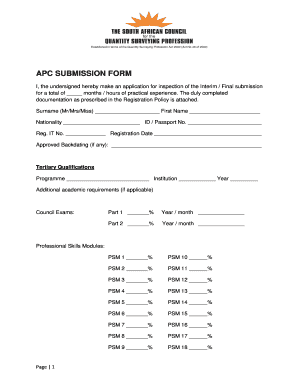
Get Apc Submission Form - C.ymcdn.com - Sacqsp Org
How it works
-

Open form follow the instructions
-

Easily sign the form with your finger
-

Send filled & signed form or save
How to fill out the APC SUBMISSION FORM - C.ymcdn.com - Sacqsp Org online
This guide provides clear instructions for users on how to accurately complete the APC Submission Form. Following these steps will help ensure that your submission is well-organized and meets the necessary requirements.
Follow the steps to complete the APC submission form effectively.
- Press the ‘Get Form’ button to access the APC submission form and open it in the editor.
- Begin by filling in your surname, first name, nationality, and ID or Passport number in the designated fields to establish your identity.
- Enter your Registration IT number and the Registration Date, ensuring accuracy to avoid delays.
- If applicable, provide any approved backdating information in the appropriate section.
- Detail your tertiary qualifications by including the programme, institution name, and year of completion as directed.
- Complete the section for Council Exams, filling in the percentages and corresponding dates for Part 1 and Part 2.
- List your Professional Skills Modules by providing the percentages for each module from PSM 1 to PSM 18 in the specified fields.
- In the Current Contact Details section, add your home telephone, work telephone, mobile number, email address, and postal address with the necessary postal code.
- For Practical Experiences in QS Work, you will need to input details for up to three employers, including the employer’s name, supervisor or mentor's name, PrQS number, employer’s address, and the duration of employment.
- Lastly, sign and date the submission to verify the accuracy of the information provided. Ensure that the declaration by the current employer or supervisor is duly filled out as well, including their signature and date.
- Once all fields are completed, save any changes you have made. You may choose to download, print, or share the form as required.
Complete your APC submission form online today to ensure a smooth registration process.
Industry-leading security and compliance
US Legal Forms protects your data by complying with industry-specific security standards.
-
In businnes since 199725+ years providing professional legal documents.
-
Accredited businessGuarantees that a business meets BBB accreditation standards in the US and Canada.
-
Secured by BraintreeValidated Level 1 PCI DSS compliant payment gateway that accepts most major credit and debit card brands from across the globe.