Loading
Get Window Decal Order Form - Wsbl1.doc. Scanned Uk Gliding Magazines
How it works
-

Open form follow the instructions
-

Easily sign the form with your finger
-

Send filled & signed form or save
How to fill out the Window Decal Order Form - WSBL1.doc. Scanned UK Gliding Magazines online
This guide provides a comprehensive overview of the Window Decal Order Form, designed for users looking to customize their decals effectively. Whether you are experienced or new to filling out such forms, this step-by-step approach will help you navigate the process with ease.
Follow the steps to complete the Window Decal Order Form smoothly.
- Click ‘Get Form’ button to obtain the form and access it in the editing interface.
- In the first field, enter your name. This is necessary for the order processing and delivery.
- Next, provide your telephone number. This contact information may be needed for any inquiries regarding your order.
- Fill in your mailing address to ensure that your decal is shipped accurately to your location.
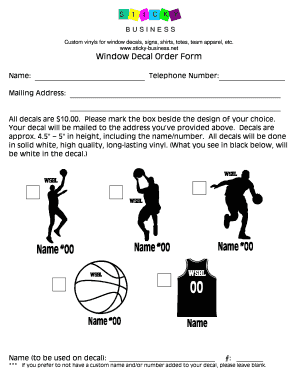
- Select your decal design by marking the box next to your choice. Remember, each decal costs $10.00.
- Input the name you would like to see on the decal in the designated field. If you do not wish to add a custom name, leave this section blank.
- If applicable, enter the number to be used on the decal in the corresponding field. Again, leave this blank if you prefer not to include a number.
- Review all the information you have entered for accuracy. Ensure that all fields are filled out according to your preferences.
- After completing the form, save your changes. You can also download, print, or share the form as necessary.
Ready to create your custom window decal? Complete the form online today!