Loading
Get Tusi Mobi
How it works
-

Open form follow the instructions
-

Easily sign the form with your finger
-

Send filled & signed form or save
How to fill out the Tusi Mobi online
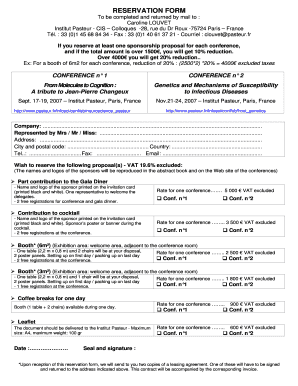
Filling out the Tusi Mobi form online can streamline your reservation process for important conferences. This guide provides comprehensive, step-by-step instructions to assist you in completing the form accurately and efficiently.
Follow the steps to successfully fill out the Tusi Mobi form.
- Press the ‘Get Form’ button to obtain the reservation form and open it in an appropriate editor.
- Begin by filling out your company name in the designated field. Ensure that the name is complete and correctly spelled.
- Indicate the person's name representing the company in the specified area, using their title where applicable.
- Provide the full address of your company, including street, city, postal code, and country, in the respective fields.
- Enter the telephone number and fax number in the corresponding fields. Ensure that international codes are included if applicable.
- Fill in your email address, checking for accuracy to ensure proper communication.
- Select the desired sponsorship proposals by checking the boxes for each conference and specifying the quantity in the provided fields.
- Review the rate for each conference and ensure that you understand any VAT exclusions before submitting.
- Attach your choice for the contribution to the gala dinner, cocktail, or booth, entering the respective details for each proposal chosen.
- Indicate the date in the provided field where the reservation is being made.
- Finally, ensure you provide a seal or signature if necessary, acknowledging your commitment, and proceed to save changes, download, print, or share the completed form.
Complete your reservation for the conferences online today for a seamless experience.
Industry-leading security and compliance
US Legal Forms protects your data by complying with industry-specific security standards.
-
In businnes since 199725+ years providing professional legal documents.
-
Accredited businessGuarantees that a business meets BBB accreditation standards in the US and Canada.
-
Secured by BraintreeValidated Level 1 PCI DSS compliant payment gateway that accepts most major credit and debit card brands from across the globe.