Loading
Form preview
  • US Legal Forms
  • Other Templates
  • Social Forms
  • Washington Social Forms
  • Wa Dshs 14-252(x) 2007

Get Wa Dshs 14-252(x) 2007-2026

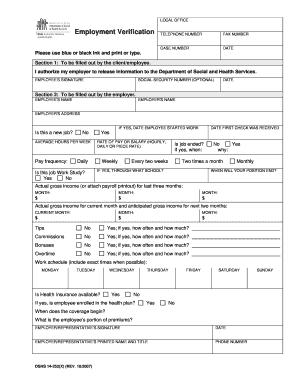
Ize my employer to release information to the Department of Social and Health Services. EMPLOYEE’S SIGNATURE SOCIAL SECURITY NUMBER (OPTIONAL) DATE Section 2: To be filled out by the employer. EMPLOYEE’S NAME EMPLOYER’S NAME EMPLOYER’S ADDRESS IF YES, DATE EMPLOYEE STARTED WORK Is this a new job? No AVERAGE HOURS PER WEEK Pay frequency: RATE OF PAY OR SALARY (HOURLY, DAILY OR PIECE RATE) Daily Is this job Work Study? Yes No DATE FIRST CHECK WAS RECEIVED Yes Weekly Is job.

How it works

  1. Open form

    Open form follow the instructions

  2. Easily sign form

    Easily sign the form with your finger

  3. Share form

    Send filled & signed form or save

How to fill out the WA DSHS 14-252(X) online

Filling out the WA DSHS 14-252(X) form online is a straightforward process that requires attention to detail. This guide will provide you with step-by-step instructions to help you complete each section effectively.

Follow the steps to accurately complete the WA DSHS 14-252(X) form.

  1. Press the ‘Get Form’ button to access the form and open it in the editor.
  2. Begin by filling out Section 1 as the client/employee. Provide your authorization for your employer to release information to the Department of Social and Health Services and sign the form.
  3. In Section 2, the employer will need to input the employee’s name, employer’s name, and address.
  4. Indicate whether this is a new job and the date the employee started work, if applicable.
  5. Provide the average hours the employee works per week and the pay frequency (daily, weekly, bi-weekly, or monthly).
  6. Fill in the rate of pay or salary and specify whether the job is Work Study, including the date the first check was received.
  7. Answer if the job has ended and, if so, provide the date. If the job is ending, indicate when.
  8. Record the actual gross income for the last three months, and for the current month along with anticipated gross income for the next two months.
  9. Next, address any additional compensation such as tips, commissions, bonuses, and overtime, specifying amounts and frequency.
  10. Outline the work schedule by listing the employee’s hours for each day of the week.
  11. Confirm if health insurance is available and whether the employee is enrolled in the plan. Include the date coverage begins and the employee’s portion of premiums.
  12. Have the employer representative sign and date the form, and provide their printed name and title, as well as a contact phone number.
  13. Once all sections are complete, save your changes, download, print, or share the form as required.

Complete your WA DSHS 14-252(X) form online today for a smooth processing experience.

Get form

Experience a faster way to fill out and sign forms on the web. Access the most extensive library of templates available.
Get form

Related content

Employment Verification
DSHS, PO BOX 11699, TACOMA WA 98411-9905. Employment Verification DSHS PHONE NUMBER. DSHS...
Learn more
Raised on the Registry
Washington State Sex Offender Registry in December 2011 to verify the difficulty in...
Learn more

Related links form

Lease Termination Letter 2020 Patient Chart Pdf 2020 Blank Superbill Templates 2020 Blank 1099 Nec

Questions & Answers

Get answers to your most pressing questions about US Legal Forms API.

Contact support

To send a fax to DSHS in Washington state, you will need to obtain the appropriate fax number based on the department handling your case. Make sure to include your case number and any required forms as per WA DSHS 14-252(X). Always keep a copy of your fax transmission report as proof of submission.

The maximum income to qualify for food stamps in Washington depends on the household size and varies yearly. Generally, your income must be at or below 200% of the federal poverty level to qualify. It's essential to review the current thresholds referenced in the WA DSHS 14-252(X) to determine your eligibility.

To submit documents to DSHS Washington State, you can use the Washington Connection online portal, which simplifies the process. You can also fax or mail your documents as per the options presented in the WA DSHS 14-252(X) instructions. Make sure to follow all submission guidelines carefully to ensure they are received.

Submitting documents to DHS is generally done through the channels specified in your program's guidelines. You can often upload documents via their online portal or send them through mail or fax. Check the specific requirements under WA DSHS 14-252(X) to avoid delays in processing your submittals.

When applying for DSHS benefits, you will need various verification documents, including identification, income statements, and residency proof. The requirement may differ based on the specific benefits you are seeking, so it is important to refer to the WA DSHS 14-252(X) for a complete checklist to ensure a smooth application process.

To submit documents on Washington Connection, log into your account and navigate to the document submission section. You can upload files directly, ensuring all documents meet the criteria set forth by WA DSHS 14-252(X). Remember to keep your confirmation receipt for your records.

Applying for DSHS benefits in Washington can be done online through the Washington Connection portal, where you will find a user-friendly application process. You can also apply in person at your local DSHS office or by calling the DSHS Customer Service Center. Make sure to reference WA DSHS 14-252(X) for specific application requirements.

To submit documents to DSHS in Washington state, you can upload the files directly through the Washington Connection online portal. Alternatively, you can mail or fax your documents if you prefer. The WA DSHS 14-252(X) guidelines provide clear instructions on what documents are needed, so make sure to follow them closely.

Typically, it takes about 30 days to receive approval for food stamps in Washington state. However, the timeline can vary depending on your documentation and the complexity of your case. You can expedite your processing by ensuring your application complies fully with the WA DSHS 14-252(X) guidelines and submitting all necessary documents promptly.

The DSHS stop work form for Washington state is an official document that you complete when you need to report changes in your employment status. This form is essential for keeping your benefits up to date and compliant with the WA DSHS 14-252(X) requirements. You can find this form on the Washington Department of Social and Health Services website to ensure you complete it correctly.

Get This Form Now!

Use professional pre-built templates to fill in and sign documents online faster. Get access to thousands of forms.
Get form
If you believe that this page should be taken down, please follow our DMCA take down processhere.
Get WA DSHS 14-252(X)
Get form
  • Adoption
  • Bankruptcy
  • Contractors
  • Divorce
  • Home Sales
  • Employment
  • Identity Theft
  • Incorporation
  • Landlord Tenant
  • Living Trust
  • Name Change
  • Personal Planning
  • Small Business
  • Wills & Estates
  • Packages A-Z
  • Affidavits
  • Bankruptcy
  • Bill of Sale
  • Corporate - LLC
  • Divorce
  • Employment
  • Identity Theft
  • Internet Technology
  • Landlord Tenant
  • Living Wills
  • Name Change
  • Power of Attorney
  • Real Estate
  • Small Estates
  • Wills
  • All Forms
  • Forms A-Z
  • Other Templates
  • Legal Hub
  • About Us
  • Help Portal
  • Legal Resources
  • Blog
  • Affiliates
  • Contact Us
  • Delete My Account
  • Site Map
  • Industries
  • Forms in Spanish
  • Localized Forms
  • State-specific Forms
  • Forms Kit
  • Real Estate Handbook
  • All Guides
  • Notarize
  • Incorporation services
  • For Consumers
  • For Small Business
  • For Attorneys
  • USLegal
  • FormsPass
  • pdfFiller
  • signNow
  • altaFlow
  • DocHub
  • Instapage
Form Packages
  • Adoption
  • Bankruptcy
  • Contractors
  • Divorce
  • Home Sales
  • Employment
  • Identity Theft
  • Incorporation
  • Landlord Tenant
  • Living Trust
  • Name Change
  • Personal Planning
  • Small Business
  • Wills & Estates
  • Packages A-Z
Form Categories
  • Affidavits
  • Bankruptcy
  • Bill of Sale
  • Corporate - LLC
  • Divorce
  • Employment
  • Identity Theft
  • Internet Technology
  • Landlord Tenant
  • Living Wills
  • Name Change
  • Power of Attorney
  • Real Estate
  • Small Estates
  • Wills
  • All Forms
  • Forms A-Z
  • Other Templates
Customer Service
  • Legal Hub
  • About Us
  • Help Portal
  • Legal Resources
  • Blog
  • Affiliates
  • Contact Us
  • Delete My Account
  • Site Map
  • Industries
  • Forms in Spanish
  • Localized Forms
  • State-specific Forms
  • Forms Kit
Legal Guides
  • Real Estate Handbook
  • All Guides
Prepared for you
  • Notarize
  • Incorporation services
Our Customers
  • For Consumers
  • For Small Business
  • For Attorneys
Our Sites
  • USLegal
  • FormsPass
  • pdfFiller
  • signNow
  • altaFlow
  • DocHub
  • Instapage
Social Media
Call us now toll free:
+1 833 426 79 33
As seen in:
© Copyright 1999-2026 airSlate Legal Forms, Inc. 17 Station Street, Suite 303, Brookline, MA 02445
  • Your Privacy Choices
  • Terms of Service
  • Privacy Notice
  • Content Takedown Policy
  • Bug Bounty Program