Loading
Get Wa Bls-700-310 2015-2026
How it works
-

Open form follow the instructions
-

Easily sign the form with your finger
-

Send filled & signed form or save
How to fill out the WA BLS-700-310 online
The WA BLS-700-310 form is an essential document for businesses seeking licensing in Washington State. This guide provides clear, step-by-step instructions on how to complete this form online, ensuring accuracy and compliance.
Follow the steps to successfully complete the WA BLS-700-310 form online.
- Press the ‘Get Form’ button to access the WA BLS-700-310 form and open it in your preferred editor.
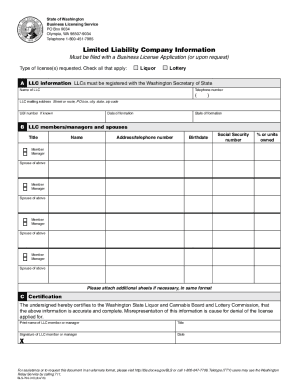
- In the section for limited liability company (LLC) information, enter the name of your LLC as registered with the Washington Secretary of State.
- Provide the telephone number of the LLC, ensuring that you format it correctly with parentheses and a dash.
- Fill in the LLC mailing address, including the street or route, PO Box (if applicable), city, state, and zip code.
- If you know your UBI number, enter it in the designated space.
- Indicate the date of formation of your LLC by selecting the appropriate date from the calendar or entering it manually.
- Specify the state of formation for your LLC in the provided field.
- List all LLC members and managers in the designated section. For each person, provide their title, full name, address with telephone number, birthdate, social security number, and their percentage or units owned.
- If there are more members or managers than the space allows, attach additional sheets in the same format.
- In the certification section, print the name of the LLC member or manager who is completing the form, along with their title.
- The designated member or manager should then sign and date the form, confirming the information provided is accurate.
- After filling out the form, save your changes and consider downloading, printing, or sharing the completed document as needed.
Complete your WA BLS-700-310 form online today for efficient processing.