Loading
Get Spravato Rems Patient Monitoring Form
How it works
-

Open form follow the instructions
-

Easily sign the form with your finger
-

Send filled & signed form or save
How to fill out the Spravato Rems Patient Monitoring Form online
Filling out the Spravato Rems Patient Monitoring Form accurately is essential for effective patient management. This guide provides detailed steps on how to complete the form online, ensuring that all necessary information is recorded and submitted properly.
Follow the steps to fill out the form accurately.
- Press the ‘Get Form’ button to access the Spravato Rems Patient Monitoring Form and open it in the online editor.
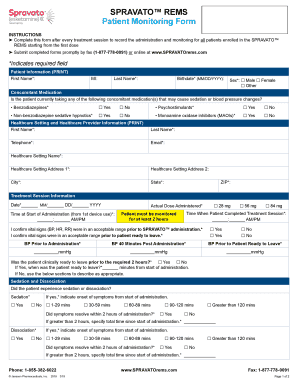
- Begin by entering patient information. Fill in the first name, middle initial, last name, birthdate, and sex. Ensure that all fields marked with an asterisk (*) are completed as they are required.
- Provide information about any concomitant medications the patient is currently taking that may cause sedation or blood pressure changes. Select 'Yes' or 'No' for each medication option provided.
- Complete the healthcare setting and healthcare provider information section. Input the first name, last name, telephone, email, healthcare setting name, and address details. All required fields must be filled out.
- In the treatment session information section, record the date, the actual dose administered, the time at start of administration, and vital signs. Ensure the monitoring duration meets the required two hours.
- Indicate if the patient experienced sedation or dissociation. For each symptom, provide the onset time and whether the symptoms resolved within the two-hour monitoring period.
- Report serious adverse events, if any, by indicating whether they occurred during the treatment session or since the last one. Fill in the necessary details regarding the event and its resolution.
- For any other adverse events not previously mentioned, use the reporting section to provide additional necessary information, ensuring to follow up as advised.
- After filling out all required sections, review the form for accuracy and completeness. Once all data is entered, users can save changes, download, print, or share the completed form.
Complete the Spravato Rems Patient Monitoring Form online to ensure timely and effective patient monitoring.
Because of the risks for sedation, dissociation, and abuse and misuse, SPRAVATO® is only available through a restricted program called the SPRAVATO® Risk Evaluation and Mitigation Strategy (REMS) Program. SPRAVATO® can only be administered at healthcare settings certified in the SPRAVATO® REMS Program.
Industry-leading security and compliance
US Legal Forms protects your data by complying with industry-specific security standards.
-
In businnes since 199725+ years providing professional legal documents.
-
Accredited businessGuarantees that a business meets BBB accreditation standards in the US and Canada.
-
Secured by BraintreeValidated Level 1 PCI DSS compliant payment gateway that accepts most major credit and debit card brands from across the globe.