Loading
Form preview
  • US Legal Forms
  • Form Library
  • More Forms
  • More Uncategorized Forms
  • Kiwisaver Deduction Form

Get Kiwisaver Deduction Form

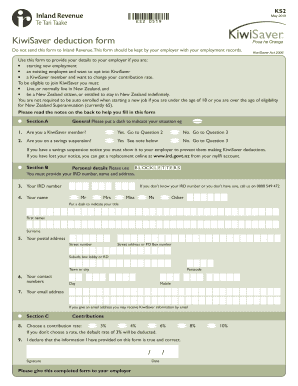
KS2May 2019KS2 0519KiwiSaver deduction form Do not send this form to Inland Revenue.This form should be kept by your employer with your employment records.KiwiSaver Act 2006Use this form to provide.

How it works

  1. Open form

    Open form follow the instructions

  2. Easily sign form

    Easily sign the form with your finger

  3. Share form

    Send filled & signed form or save

How to fill out the KiwiSaver deduction form online

This guide will walk you through the process of completing the KiwiSaver deduction form online. Whether you are a new employee, an existing worker looking to opt into KiwiSaver, or an individual wanting to change your contribution rate, this guide will provide clear steps to help you navigate the form effectively.

Follow the steps to complete the KiwiSaver deduction form.

  1. Click ‘Get Form’ button to obtain the KiwiSaver deduction form and open it in your editor.
  2. In Section A, indicate your current status by placing a dash in the appropriate box. This includes stating whether you are a KiwiSaver member or if you are on a savings suspension.
  3. Proceed to Section B and fill out your personal details. Use block letters for clarity. Enter your IRD number, full name, postal address, and contact information, including both a day number and a mobile number, if applicable.
  4. In Section C, choose your contribution rate from the options provided: 3%, 4%, 6%, 8%, or 10%. If you don’t select a rate, the default of 3% will be applied.
  5. Confirm that the information provided is accurate by signing the form and adding the date of completion.
  6. Once all sections are complete, save your changes, download, print, or share the form as necessary, making sure to submit it to your employer.

Complete your KiwiSaver deduction form online today to ensure your contributions are processed without delay.

Get form

Experience a faster way to fill out and sign forms on the web. Access the most extensive library of templates available.
Get form

Related content

About Form 8621, Information Return by a...
Sep 19, 2020 — A U.S. person that is a direct or indirect shareholder of a passive...
Learn more
National Retirement Savings Systems in Australia...
of their accounts, for a total deduction of ... receive funds in any form from their...
Learn more

Related links form

2021 W 4 Form Oregon Indiana State Form 55390 R7 8 17 19962- SD-DST - Delta Faucet Sudds 5

Questions & Answers

Get answers to your most pressing questions about US Legal Forms API.

Contact support

Use this form to opt out if you have been automatically enrolled, are a minor who was incorrectly enrolled, and you don't want to. be a member of KiwiSaver. Or go to ird.govt.nz/kiwisaver to complete our online form. Read the notes on the back to help. you fill in this form.

Each time you pay salary or wages to an employee in a KiwiSaver scheme or a complying fund you deduct contributions from their pay. This deduction is your employee's contribution to their scheme.

If you opted out online They'll stop deducting KiwiSaver from your pay. We'll refund you any member contributions your employer has sent us. Your employer will refund you any remaining member contributions they have deducted from your pay. It generally takes 30 working days to process a refund.

Ask your employer for a KiwiSaver information pack KS3 and complete the KiwiSaver deduction KS2 form. Give it to your employer and they will start your KiwiSaver deductions from your next pay. You can also join directly with a provider. If you join directly with a provider or if you opt-in you cannot opt out.

KiwiSaver deduction form (employee to complete and give to employer) Use this form to provide your details to your employer if you are: starting new employment an existing employee and want to opt into KiwiSaver a KiwiSaver member and want to change your contribution rate.

You do not have to join KiwiSaver or remain a member if you are automatically enrolled. But if you do choose to opt in, contributions are compulsory at the prescribed level (unless they are granted a contributions holiday).

This means they've chosen their own scheme and joined KiwiSaver through them. If your employee opts in with a scheme provider, we'll write to you to let you know: they've opted in with a scheme provider. your employee's IRD number. the rate by which they want you to deduct KiwiSaver contributions from their pay.

Get This Form Now!

Use professional pre-built templates to fill in and sign documents online faster. Get access to thousands of forms.
Get form
If you believe that this page should be taken down, please follow our DMCA take down processhere.

Industry-leading security and compliance

US Legal Forms protects your data by complying with industry-specific security standards.
  • In businnes since 1997
    25+ years providing professional legal documents.
  • Accredited business
    Guarantees that a business meets BBB accreditation standards in the US and Canada.
  • Secured by Braintree
    Validated Level 1 PCI DSS compliant payment gateway that accepts most major credit and debit card brands from across the globe.
Get KiwiSaver Deduction Form
Get form
  • Adoption
  • Bankruptcy
  • Contractors
  • Divorce
  • Home Sales
  • Employment
  • Identity Theft
  • Incorporation
  • Landlord Tenant
  • Living Trust
  • Name Change
  • Personal Planning
  • Small Business
  • Wills & Estates
  • Packages A-Z
  • Affidavits
  • Bankruptcy
  • Bill of Sale
  • Corporate - LLC
  • Divorce
  • Employment
  • Identity Theft
  • Internet Technology
  • Landlord Tenant
  • Living Wills
  • Name Change
  • Power of Attorney
  • Real Estate
  • Small Estates
  • Wills
  • All Forms
  • Forms A-Z
  • Form Library
  • Legal Hub
  • About Us
  • Help Portal
  • Legal Resources
  • Blog
  • Affiliates
  • Contact Us
  • Delete My Account
  • Site Map
  • Industries
  • Forms in Spanish
  • Localized Forms
  • State-specific Forms
  • Forms Kit
  • Real Estate Handbook
  • All Guides
  • Notarize
  • Incorporation services
  • For Consumers
  • For Small Business
  • For Attorneys
  • USLegal
  • FormsPass
  • pdfFiller
  • signNow
  • altaFlow
  • DocHub
  • Instapage
Form Packages
  • Adoption
  • Bankruptcy
  • Contractors
  • Divorce
  • Home Sales
  • Employment
  • Identity Theft
  • Incorporation
  • Landlord Tenant
  • Living Trust
  • Name Change
  • Personal Planning
  • Small Business
  • Wills & Estates
  • Packages A-Z
Form Categories
  • Affidavits
  • Bankruptcy
  • Bill of Sale
  • Corporate - LLC
  • Divorce
  • Employment
  • Identity Theft
  • Internet Technology
  • Landlord Tenant
  • Living Wills
  • Name Change
  • Power of Attorney
  • Real Estate
  • Small Estates
  • Wills
  • All Forms
  • Forms A-Z
  • Form Library
Customer Service
  • Legal Hub
  • About Us
  • Help Portal
  • Legal Resources
  • Blog
  • Affiliates
  • Contact Us
  • Delete My Account
  • Site Map
  • Industries
  • Forms in Spanish
  • Localized Forms
  • State-specific Forms
  • Forms Kit
Legal Guides
  • Real Estate Handbook
  • All Guides
Prepared for you
  • Notarize
  • Incorporation services
Our Customers
  • For Consumers
  • For Small Business
  • For Attorneys
Our Sites
  • USLegal
  • FormsPass
  • pdfFiller
  • signNow
  • altaFlow
  • DocHub
  • Instapage
Social Media
Call us now toll free:
+1 833 426 79 33
As seen in:
© Copyright 1999-2026 airSlate Legal Forms, Inc. 3720 Flowood Dr, Flowood, Mississippi 39232
  • Your Privacy Choices
  • Terms of Service
  • Privacy Notice
  • Content Takedown Policy
  • Bug Bounty Program