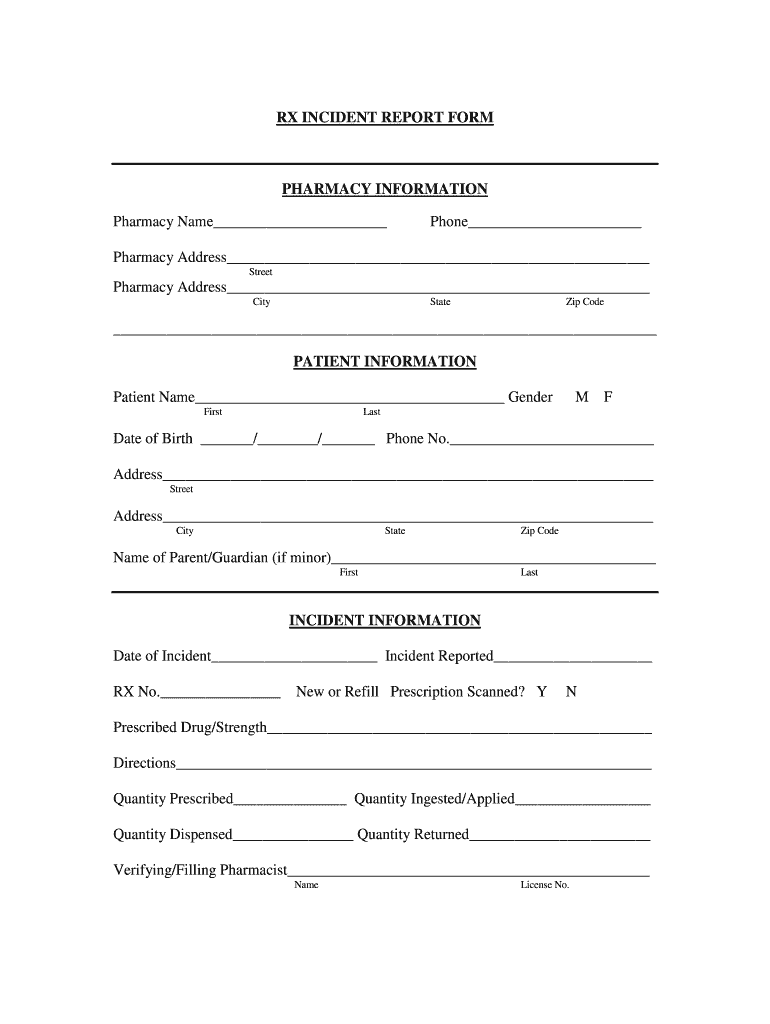
Harmacy Address________________________________________________________ City State Zip Code ________________________________________________________________________ PATIENT INFORMATION Patient Name_________________________________________ Gender First M F Last Date of Birth _______/________/_______ Phone No.___________________________ Address_________________________________________________________________ Street Address_________________________________________________________________ Ci.

Open form follow the instructions

Easily sign the form with your finger

Send filled & signed form or save
How to fill out the KS RX Incident Report Form online
The KS RX Incident Report Form is a critical document designed for reporting incidents related to prescription medications in pharmacies. This guide will provide you with clear, step-by-step instructions to complete this form online effectively.
Follow the steps to fill out the KS RX Incident Report Form accurately.
- Click the ‘Get Form’ button to access the KS RX Incident Report Form and open it in your preferred online editor.
- Begin with the pharmacy information section. Fill in the pharmacy name, phone number, and complete address details, including street, city, state, and zip code.
- Proceed to the patient information section. Input the patient’s full name, gender, date of birth, and phone number. Additionally, provide the patient's address, including street, city, state, and zip code. If the patient is a minor, include the name of the parent or guardian.
- In the incident information section, enter the date of the incident and when the incident was reported. Include the RX number associated with the prescription in question.
- Indicate whether a new or refill prescription was scanned by marking 'Y' for yes or 'N' for no. Fill in the details for the prescribed drug and its strength, along with dosage directions.
- Record the quantities prescribed, ingested/applied, dispensed, and returned in their respective fields.
- Provide the name and license number of the verifying or filling pharmacist. Also, list other personnel involved in the incident, including their license or registration numbers.
- Describe the incident in detail, specifying the nature of the error from the provided options, such as wrong drug, incorrect dosage, or inadequate packaging.
- Indicate whether the prescriber was contacted by marking 'Y' or 'N' and recording their name if applicable.
- Lastly, collect and include the signatures of all pharmacy employees who were involved in the incident.
- Once all fields are completed, review the information for accuracy. You can then save the changes, download the form, print it, or share it as needed.
Start filling out the KS RX Incident Report Form online to ensure accurate reporting and efficient handling of any incidents.
Experience a faster way to fill out and sign forms on the web. Access the most extensive library of templates available.
Related content
Incident Report Form. C-650, CQI Incident Report Evaluation. C-550, CQI Bimonthly Summary...
Jan 31, 2020 — Simply present this CorVel First Fill Prescription Form to the pharmacy...
Once you have selected a code or codes from the "Vehicle Use" field that indicates a motor...
Get answers to your most pressing questions about US Legal Forms API.
How do I fill out a medical incident report?
Filling out a medical incident report involves documenting specific information related to a medical event. You should include patient information, a description of the incident, any actions taken, and the outcomes. The KS RX Incident Report Form is an ideal tool for this, as it guides you through the essential components while ensuring accuracy. This thorough approach ensures compliance and supports patient safety efforts.
What are the four types of incident reporting?
The four types of incident reporting often include near misses, accidents, injuries, and property damage. Each type serves a specific purpose in identifying trends and preventing future incidents. Understanding these categories can significantly enhance organizational safety measures. Utilizing the KS RX Incident Report Form allows you to effectively categorize and record these incidents.
How do I create an incident report form?
To create an incident report form, identify the essential elements required for effective reporting. You should include areas for date, time, location, involved parties, and a description of the incident. The KS RX Incident Report Form offers a convenient structure for this purpose, making it easy to customize for your organization. This helps simplify the reporting process and ensures thorough documentation.
How to do an incident report template?
Creating an incident report template involves outlining the key information needed to document an event. Important sections typically include details about the incident, witnesses, and any actions taken. Utilizing a pre-designed template like the KS RX Incident Report Form can save time and ensure you capture all necessary details. This approach allows for streamlined and consistent reporting.
Is an incident report a formal report?
Yes, an incident report is considered a formal report. It serves as an official account of incidents that can be used for legal, regulatory, and safety compliance. By adhering to formal reporting practices—using the KS RX Incident Report Form—you ensure the information is credible and structured. This fosters accountability and provides a record for future analysis.
What form is used for incident reporting?
For effective incident reporting, various forms are available, including the KS RX Incident Report Form. This specific form is tailored for capturing necessary information in a concise manner. It is crucial for organizations to use a standardized form to ensure consistency and completeness in reporting. By utilizing the KS RX Incident Report Form, you enhance your reporting process.
What kind of report is an incident report?
An incident report is an official document that outlines the details of an unexpected event. This report serves as a record that can be reviewed for future reference and learning purposes. It typically includes facts about the incident, individuals involved, and immediate actions taken. The KS RX Incident Report Form is designed to assist in documenting these critical elements efficiently.
What is incident reporting?
Incident reporting is the process of documenting any event that deviates from the expected norms within an organization. This documentation helps ensure that safety and operational issues are addressed promptly. Using tools like the KS RX Incident Report Form can streamline this process. It provides a structured method to capture essential details surrounding the incident.
How to fill an incident report form?
To fill an incident report form, start by gathering all relevant details about the incident. Be thorough in your account, including time, location, individuals involved, and witness information. Using the KS RX Incident Report Form will guide you through each section, ensuring that your report is systematic and comprehensive.
What is an example of a medical incident?
An example of a medical incident can be a patient experiencing an allergic reaction during treatment. It's crucial to document these incidents promptly to improve patient care and safety. The KS RX Incident Report Form is designed to capture all necessary details regarding medical incidents efficiently, ensuring proper follow-up actions are taken.
Use professional pre-built templates to fill in and sign documents online faster. Get access to thousands of forms.
If you believe that this page should be taken down, please follow our DMCA take down process here.