Loading
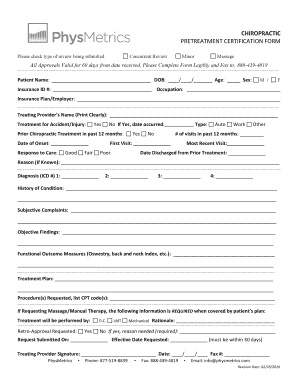
Get Physmetrics - Chiro Pretreatment Request Form Rev. 2019.doc
How it works
-

Open form follow the instructions
-

Easily sign the form with your finger
-

Send filled & signed form or save
How to fill out the Physmetrics - CHIRO Pretreatment Request Form Rev. 2019.doc online
Filling out the Physmetrics - CHIRO Pretreatment Request Form Rev. 2019.doc is an important step in ensuring proper treatment preparation. This guide provides a detailed, step-by-step approach to completing the form accurately and efficiently online.
Follow the steps to complete the form online:
- Press the ‘Get Form’ button to access the Physmetrics - CHIRO Pretreatment Request Form Rev. 2019.doc and open it in the appropriate online tool.
- Begin by selecting the type of review you are submitting: Concurrent Review, Minor, Massage.
- Enter the patient’s name and date of birth in the specified fields. Ensure to accurately provide the age and sex of the patient.
- Fill in the insurance ID number along with the patient’s occupation and insurance plan/employer details.
- Clearly print the treating provider's name in the designated field.
- Indicate if the treatment is for an accident or injury by ticking 'Yes' or 'No' and providing the date and type of accident if applicable.
- Document any prior chiropractic treatment within the last 12 months, including the date of onset and response to care.
- Record the total number of visits in the past year, as well as details of the first and most recent visit.
- Note the date of discharge from any prior treatment and provide the reason if known.
- List the diagnoses in the specified ICD codes sections. Up to four codes can be provided.
- Outline the history of the patient’s condition and their subjective complaints in the provided areas.
- Summarize the objective findings observed during the examination.
- Specify any functional outcome measures used, such as the Oswestry or back and neck index.
- Detail the treatment plan as discussed and any procedure requests along with corresponding CPT codes.
- If applicable, fill in information regarding massage/manual therapy, indicating who will perform the treatment.
- Select if retro-approval is needed and explain the reason if so.
- Include the request submitted date and the effective date requested, ensuring it is within 30 days.
- Finally, sign and date the form at the bottom, and provide a fax number to ensure transmission.
Take the next step to efficiently complete your documentation online.