Loading
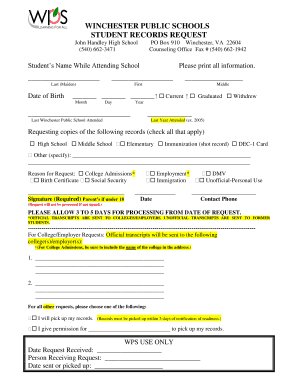
Get John Handley High Transcript Requestwinchester, Va ...
How it works
-

Open form follow the instructions
-

Easily sign the form with your finger
-

Send filled & signed form or save
How to fill out the John Handley High Transcript Request online
Filling out the John Handley High Transcript Request form is a straightforward process that allows individuals to request their academic records efficiently. This guide provides clear, step-by-step instructions to assist you in completing the form online.
Follow the steps to complete your transcript request online.
- Press the ‘Get Form’ button to access the form and open it in your preferred file editor.
- Begin by entering the student’s name as it appeared while attending school. You should provide the last name, including any maiden name, and then fill in the first and middle names.
- Input the student’s date of birth using the format: Month, Day, Year.
- Select the appropriate status box: Current, Graduated, or Withdrew.
- Indicate the last Winchester Public School attended by writing the name in the specified section.
- Provide the last year attended by entering a year, for example, 2005.
- In the request section, check all applicable records you are requesting, such as High School, Middle School, Elementary, Immunization records, or any other documents.
- Explain the reason for your request by checking the relevant box, such as College Admissions, Employment, DMV, or Unofficial-Personal Use.
- Sign the form. If the student is under 18, a parent or guardian must sign.
- Include the date of signing and your contact phone number.
- If you are requesting records for a college or employer, include the full address where the transcripts should be sent.
- Choose between options for picking up the records or granting permission to another individual to do so.
- Once all sections are filled out, review your information for accuracy.
- Save your changes, and print or download the form as needed for submission.
Complete your transcript request online today for a seamless experience.
Transcripts: Please email mary.andrade@austinisd.org with any transcript request questions. Currently Enrolled Students: Current Anderson students must use Naviance for all transcript requests. To access Naviance, you must sign in through your student portal.
Industry-leading security and compliance
US Legal Forms protects your data by complying with industry-specific security standards.
-
In businnes since 199725+ years providing professional legal documents.
-
Accredited businessGuarantees that a business meets BBB accreditation standards in the US and Canada.
-
Secured by BraintreeValidated Level 1 PCI DSS compliant payment gateway that accepts most major credit and debit card brands from across the globe.