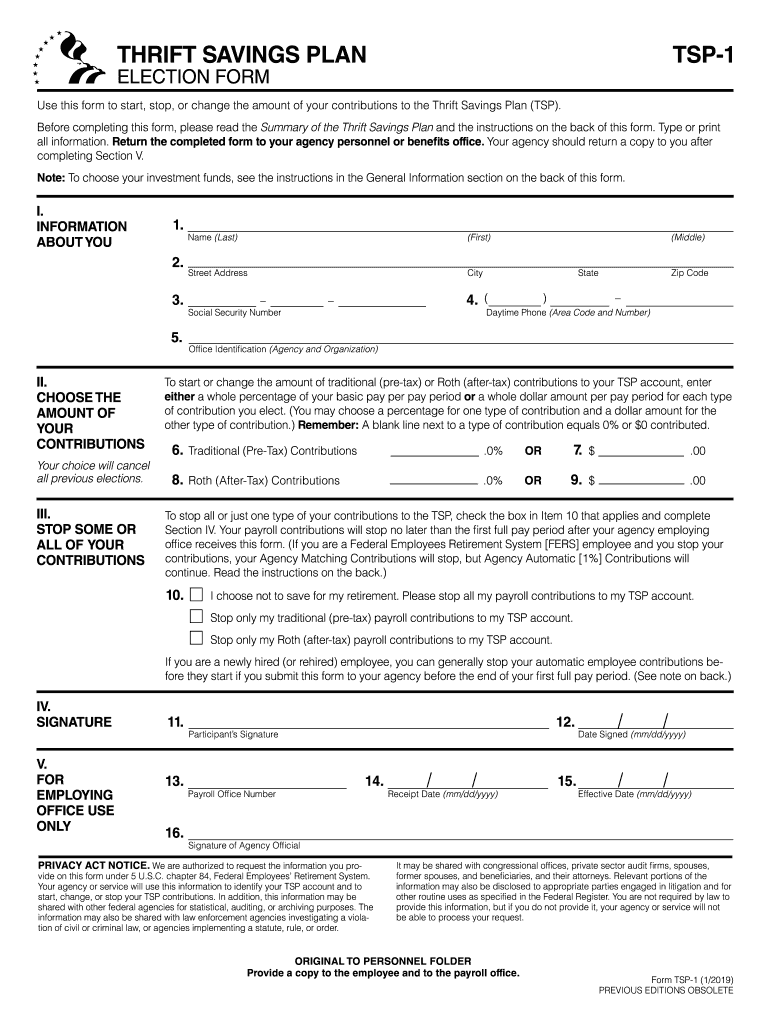
stop your TSP contributions. In addition, this information may be shared with other federal agencies for statistical, auditing, or archiving purposes. The information may also be shared with law enforcement agencies investigating a violation of civil or criminal law, or agencies implementing a statute, rule, or order. It may be shared with congressional offices, private sector audit firms, spouses, former spouses, and beneficiaries, and their attorneys. Relevant portions of the information may.
Loading

Open form follow the instructions

Easily sign the form with your finger

Send filled & signed form or save
How to fill out the TSP-1 online
The TSP-1 form is an essential document for users wishing to start, stop, or modify their contributions to the Thrift Savings Plan. This guide provides detailed, user-friendly instructions to help you navigate the online version of the form with ease.
Follow the steps to successfully complete the TSP-1 form online.
- Click ‘Get Form’ button to access the TSP-1 form and open it in your preferred online document editor.
- In Section I, fill in your personal information. This includes your name (last, first, middle), street address, city, state, zip code, social security number, and daytime phone number.
- In Section II, choose your desired contribution amounts. Specify either a percentage or a dollar amount for both traditional (pre-tax) and Roth (after-tax) contributions. Note that entering a blank line will signify a contribution amount of 0% or $0.
- If you want to stop some or all of your contributions, complete Section III. Check the appropriate box for stopping contributions according to your preference.
- In Section IV, provide your signature and the date. This signifies your agreement and understanding of the changes you are requesting.
- Section V is for agency use only. Ensure that the personnel office processes your form timely and provides you with a copy once completed.
- After completing all sections, save your changes. You may then choose to download, print, or share the completed TSP-1 form as needed.
Complete your TSP-1 form online today and take control of your retirement contributions.
Experience a faster way to fill out and sign forms on the web. Access the most extensive library of templates available.
Related content
by Z Lopez-Dee · 2011 · Cited by 336 — This paper will discuss the role of TSP-1 in...
Use this form to start, stop, or change the amount of your contributions to the Thrift...
1 lemon. 1 to 3 tablespoons juice, 1 - 1.5 teaspoons grated zest. 4 large lemons. 1 cup...
Get answers to your most pressing questions about US Legal Forms API.
Where do I send my TSP-1 form?
After completing your TSP-1 form, send it to your agency's human resources or payroll department. Each agency may have its specific submission requirements, so it is essential to check their guidelines. Be sure to keep a copy of your TSP-1 form for your records. If you have questions, uslegalforms can assist you in ensuring proper submission and compliance.
How do I report my TSP on my taxes?
Reporting your TSP-1 on your taxes involves including Form 1040 and any relevant TSP tax documents you receive. Report your contributions and any distributions accurately to ensure compliance with IRS regulations. Remember, TSP contributions can reduce your taxable income, providing potential tax benefits. For detailed instructions, uslegalforms can help you find the necessary forms and guidance tailored for your situation.
How do I set up my TSP for the first time?
To set up your TSP-1 for the first time, visit the official TSP website and follow the outlined steps. You will need to provide your personal information, including your Social Security number and employment details. Ensure that you choose your contribution amount and fund allocation wisely, as these decisions will impact your retirement savings. If you need assistance, uslegalforms offers templates and guidance to help you navigate the setup process.
What is the 4% rule for TSP?
The 4% rule for TSP is a common guideline suggesting that retirees can withdraw 4% of their retirement savings annually without depleting their accounts too quickly. This rule gives you a framework for managing withdrawals and sustaining your retirement funds over time. Using TSP effectively ensures you have a steady income in your retirement years.
What is a good percentage to contribute to TSP?
A good percentage to contribute to TSP can vary, but many experts recommend starting with at least 5% of your salary. This amount often allows you to take full advantage of agency matching contributions, maximizing your retirement savings potential. Regularly reviewing and adjusting your contributions can help you stay on track.
What is a 1% agency contribution to TSP?
A 1% agency contribution to TSP represents a contribution that your employer automatically makes to your retirement plan, regardless of whether you contribute yourself. This contribution increases your overall TSP savings without any effort on your part. Utilizing this advantage helps strengthen your financial future.
How to designate TSP beneficiary?
To designate a TSP beneficiary, you need to fill out a beneficiary designation form available on the TSP website. You can select one or more individuals, along with alternate beneficiaries, to ensure your savings are distributed according to your wishes. Keep your beneficiary information updated for clarity and security.
What is the TSP for dummies?
The TSP for dummies is a simplified explanation of the Thrift Savings Plan, which is a retirement savings plan for federal employees and members of the uniformed services. It allows you to save and invest part of your paycheck before tax. Learning the basics of TSP helps you make informed decisions about your retirement savings.
Do agency matching contributions count towards TSP limit?
Yes, agency matching contributions do count towards your TSP limit. This means if your agency matches your contributions, those amounts will be included in your overall contribution limit for the year. It's essential to be aware of these limits to effectively plan your retirement savings strategy.
How to set up TSP for the first time?
To set up your TSP for the first time, you need to complete an online application through the TSP website or your agency's HR platform. Make sure to have all necessary personal information, such as your Social Security number, and bank details for direct deposits. Once completed, you can start contributing and watch your savings grow.
Use professional pre-built templates to fill in and sign documents online faster. Get access to thousands of forms.
If you believe that this page should be taken down, please follow our DMCA take down process here.