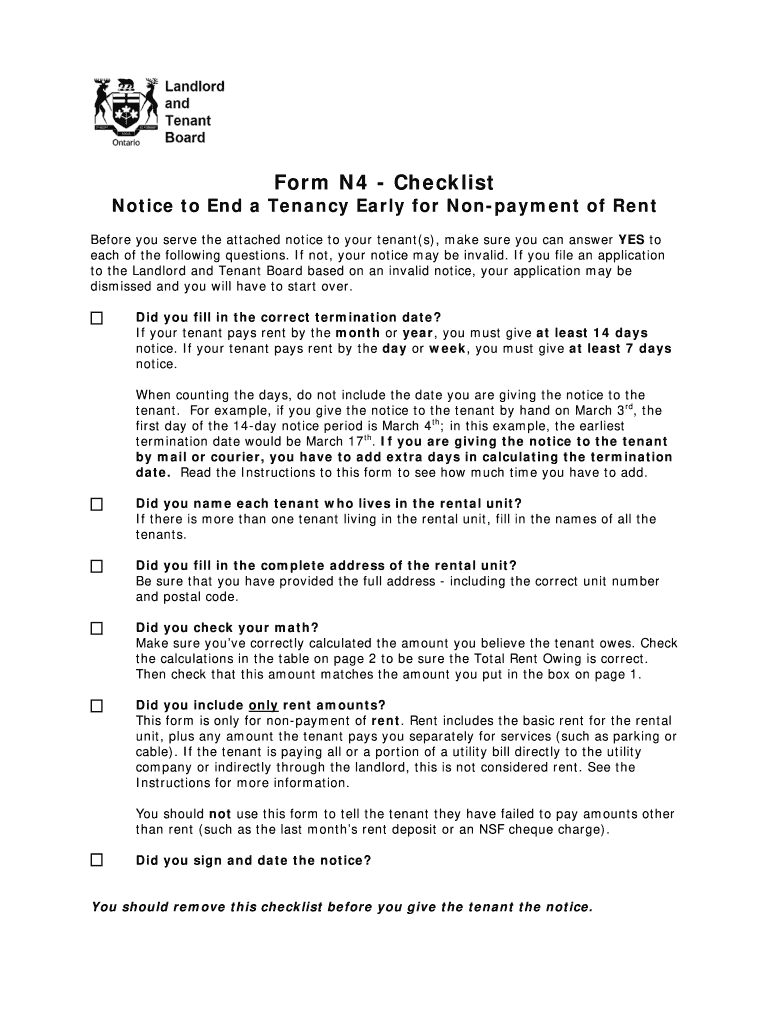
F not, your notice may be invalid. If you file an application to the Landlord and Tenant Board based on an invalid notice, your application may be dismissed and you will have to start over. Did you fill in the correct termination date? If your tenant pays rent by the month or year, you must give at least 14 days notice. If your tenant pays rent by the day or week, you must give at least 7 days notice. When counting the days, do not include the date you are giving the notice to the tenant. For ex.
Loading

Open form follow the instructions

Easily sign the form with your finger

Send filled & signed form or save
How to fill out the Canada LTB N4 - Ontario online
Navigating the process of filling out the Canada LTB N4 form can be straightforward with the right guidance. This guide provides a clear, step-by-step approach to ensure that you accurately complete the notice to end a tenancy early for non-payment of rent.
- Click ‘Get Form’ button to obtain the form and open it in your preferred editing tool.
- Begin by entering the tenant's name at the top of the form. Ensure the name is accurate as it must match official documents.
- Next, fill in the landlord's name. This identifies who is serving the notice.
- Complete the address of the rental unit, including the street number, street name, street type, unit number, municipality, and postal code. Double-check for accuracy to avoid delays.
- In the section regarding the amount owed, clearly indicate the total rent amount being claimed. Ensure this total matches the calculations you provide in the subsequent table.
- Review the termination date. Ensure it is at least 14 days from the date you provide the notice if the rent is paid monthly, or 7 days for weekly payments. Remember not to count the notice date.
- Fill in the detailed breakdown of rent owed in the table provided on page 2. Accurately input the rent charged, rent paid, and rent owing for each period. Verify these calculations to ensure they are correct.
- Make sure to include your signature and the date of signing at the bottom of the form. This is required for the notice to be valid.
- Before giving the notice to the tenant, remove this checklist. Once completed, you can save changes, download, print, or share the filled form as needed.
Complete your documents online today to ensure a smooth process!
Experience a faster way to fill out and sign forms on the web. Access the most extensive library of templates available.
Related content
by EM Brown · 2023 · Cited by 4 — Our objective was to examine how three bans on...
mediation process?A3: Yes, the Ontario Landlord and Tenant Board (LTB) offers guidance on...
Get answers to your most pressing questions about US Legal Forms API.
What is the quickest way to evict a tenant?
The quickest way to evict a tenant in Ontario is to issue the N4 notice promptly when rent is overdue. Ensure you follow the required notice periods to maintain compliance with legal standards. After the notice period ends without payment, you can apply to the LTB for an eviction order. Utilizing the USLegalForms platform can streamline your approach to evictions under Canada LTB N4 - Ontario.
Can you email an N4 in Ontario?
No, you cannot email an N4 notice in Ontario. The N4 must be delivered in person or sent by mail to ensure proper service per LTB regulations. Familiarizing yourself with the legal requirements can save you from potential complications. For more guidance on serving notices correctly, explore resources on USLegalForms regarding Canada LTB N4 - Ontario.
How much notice is required to evict a tenant in Ontario?
In Ontario, the notice period required for eviction depends on the reason for eviction. For non-payment of rent, the N4 form provides a 14-day notice period. This gives tenants a fair chance to settle their rent obligations before further action is taken. It's essential to follow these regulations to ensure compliance with the Canada LTB N4 - Ontario process.
How to file with LTB Ontario?
To file with the LTB in Ontario, you need to complete the necessary application forms, including the N4 if you seek eviction for non-payment of rent. You can submit your application online or in person at your local LTB office. Keep in mind, using tools from USLegalForms can simplify this process, helping you prepare and file your documents related to Canada LTB N4 - Ontario.
How to fill out a N4 form in Ontario?
Filling out the N4 form in Ontario involves providing specific information about the tenant and the rental agreement. You must include details like the tenant's name, address, and the rent owed. Next, you should clearly state the amount of rent that is overdue. For assistance with correctly completing the form, consider using resources available on the USLegalForms platform, which can guide you through the process of Canada LTB N4 - Ontario.
How long is the wait for LTB in Ontario?
The wait time for the LTB, or Landlord and Tenant Board, in Ontario can vary depending on a few factors. Typically, it can take anywhere from a few weeks to a couple of months to receive a hearing date. During high-demand periods, this wait may increase. For a faster resolution, utilizing platforms like uslegalforms can streamline your process related to the Canada LTB N4 - Ontario.
How to tell landlord you're moving out in Ontario?
To inform your landlord that you are moving out in Ontario, provide written notice that includes your intended move-out date. The notice should align with your lease agreement, typically requiring at least 30 days' notice. It's essential to communicate clearly and professionally to avoid misunderstandings. If you need help on how to draft a proper notice, uslegalforms can provide you with a template tailored to Ontario's requirements.
What's the soonest you can evict a tenant?
In Ontario, you can begin the eviction process as soon as you issue a Canada LTB N4 notice for non-payment of rent, which requires at least 14 days' notice. Once the notice period lapses without payment, you can file for an eviction hearing. However, quick action may depend on the circumstances surrounding the tenancy. Utilizing platforms like uslegalforms can help you navigate these timelines effectively and efficiently.
What is the N4 process in Ontario?
The N4 process in Ontario is a framework for landlords to formally communicate the intent to terminate a tenancy due to non-payment of rent. It involves completing the Canada LTB N4 - Ontario form and serving it appropriately to the tenant. After serving the notice, the landlord may initiate eviction proceedings if rent remains unpaid. Accessing resources from UsLegalForms can simplify understanding and completing the N4 process effectively.
How do I serve my N4 form in Ontario?
To serve your N4 form in Ontario, you must choose an appropriate method such as personal delivery, registered mail, or leaving it with an adult at the rental address. Each method has its own guidelines that must be followed to ensure proper service. By utilizing the correct approach, you enhance the likelihood of a smooth LTB process. Platforms like UsLegalForms can provide the necessary templates to simplify this task.
Use professional pre-built templates to fill in and sign documents online faster. Get access to thousands of forms.
If you believe that this page should be taken down, please follow our DMCA take down process here.
This form is available in several versions. Select the version you need from the drop-down list below.