Loading
Form preview
  • US Legal Forms
  • Other Templates
  • Industry Forms
  • Industry Insurance & Medical Forms
  • Ph Rf-1 2014

Get Ph Rf-1 2014-2026

,000.00 525.00 262.50 262.50 15 22,000.00 to 22,999.99 22,000.00 550.00 275.00 275.00 16 23,000.00 to 23,999.99 23,000.00 575.00 287.50 287.50 17 24,000.00 to 24,999.99 24,000.00 600.00 300.00 300.00 18 25,000.00 to 25,999.99 25,000.00 625.00 312.50 312.50 19 26,000.00 to 26,999.99 26,000.00 650.00 325.00 325.00 20 27,000.00 to 27,999.99 27,000.00 675.00 337.50 337.50 28,000.00 to 28,999.99 28,000.00 700.00 350.00 350.00 22 29,000.00 t.

How it works

  1. Open form

    Open form follow the instructions

  2. Easily sign form

    Easily sign the form with your finger

  3. Share form

    Send filled & signed form or save

How to fill out the PH RF-1 online

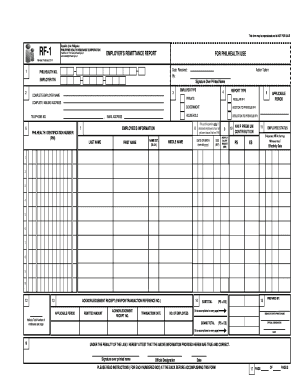
The PH RF-1 form is an essential document for employers to report health insurance contributions to the Philippine Health Insurance Corporation. This guide provides step-by-step instructions to assist users in accurately completing the form online.

Follow the steps to successfully complete the PH RF-1 online

  1. Click the ‘Get Form’ button to access the form and open it in your preferred editor.
  2. Provide your PhilHealth number and Employer TIN in the designated boxes. Ensure that these numbers are correct and up-to-date.
  3. Fill in the complete employer name, mailing address, telephone number, and email address. Avoid abbreviations to ensure clarity.
  4. Select the appropriate employer type by checking the corresponding box.
  5. Choose the report type relevant to your submission by checking the applicable box for regular reporting or adjustments to previous submissions.
  6. List employee information in the designated fields, including PhilHealth Identification Number, name, date of birth, gender, and salary bracket. For new employees without a PIN, include their date of birth and gender.
  7. Indicate the respective personal share (PS) and employer share (ES) in the corresponding boxes for each employee listed.
  8. After completing the employee details, include any deductions or additions to previous reports as needed by checking the appropriate sections.
  9. Fill in the total number of employees being reported and calculate the subtotal of contributions from the personal share and employer share.
  10. Finalize the form by including the signature over the printed name of the person preparing the report, along with their official designation and the date.
  11. Upon completion, you can save changes, download the document, print a copy, or share it as necessary.

Complete your PH RF-1 form online today to ensure timely reporting of health insurance contributions.

Get form

Experience a faster way to fill out and sign forms on the web. Access the most extensive library of templates available.
Get form

Related content

On the pH dependence of class-1 RF- ...
by G Indrisiunaite · 2015 · Cited by 53 — We propose that RF-dependent termination...
Learn more
His-tag Purification of RF1:
→ Adjust pH to 8.0 with NaOH. → Raise final volume to 1L. Wash Buffer: 50mM. NaH2PO4...
Learn more
Wireless pH/Temperature Transmitter
Each unit measures and transmits: pH, Ambient Temperature,. RF Signal Strength and Battery...
Learn more

Related links form

T4a 2020 Imm 5558 2020 Ds 2032 2020 Vfc Daily Usage Log 2020

Questions & Answers

Get answers to your most pressing questions about US Legal Forms API.

Contact support

The main function of PH RF-1 is to facilitate the generation of legal forms easily. It provides users with a powerful tool to customize and create documents that are essential for various legal activities. By utilizing RF-1, individuals and businesses can navigate the legal landscape more effectively.

The PH RF-1 binds at the specified locations on the legal document as per the provided guidelines. This ensures that all necessary legalities are properly addressed and documented. By following the binding instructions, users can ensure that their documents are complete and valid.

RF1 refers to a specific feature that simplifies legal processes related to form generation. It acts as a guide for users to access necessary legal forms tailored to their needs. Understanding PH RF-1 allows users to leverage its functions, ensuring compliance and effectiveness in legal documentation.

In the context of termination, PH RF-3 outlines the necessary steps and documentation required for effective contract termination. It provides clarity on the rights and obligations of all parties involved. This feature is vital, as it minimizes the risk of disputes and ensures a smooth transition during the termination process.

The PH RF-1 serves as a comprehensive tool designed to streamline legal documentation processes. It enables users to generate essential forms and documents efficiently. This feature enhances organization and ensures compliance with legal standards, making legal tasks straightforward.

RF1 in PhilHealth refers to 'Registration Form 1', which is essential for registration as a member. Completing the RF1 allows you to enjoy the benefits of PhilHealth coverage while ensuring you are compliant with the requirements of the PH RF-1. This form is your gateway to access healthcare services, making it a pivotal part of your registration process. If you need assistance with the registration, USLegalForms offers valuable guidance.

Member type G in PhilHealth refers to 'Government Employees'. This category includes individuals working for governmental agencies who receive compensation through the national budget. Members in this group have specific contribution rates tied to their salary. Understanding your member type is vital when utilizing your benefits under the PH RF-1, ensuring you receive the coverage you deserve.

The premium contribution for PhilHealth varies depending on your member type and salary bracket. For most employed members, the rate is a percentage of your basic salary, which may change annually. It's important to stay updated on these rates to ensure you are compliant with the PH RF-1 requirements and to enjoy the benefits of membership. If you’re unsure about your contributions, USLegalForms provides resources that can assist you.

To obtain a PhilHealth receipt, you can request it through the PhilHealth online portal or directly from a branch office. When making your request, ensure that you have your member information ready. Collecting your receipts is important for maintaining proof of contributions, particularly when submitting documents like the PH RF-1.

RVU stands for Relative Value Unit in PhilHealth, which measures the value of healthcare services. This unit assists in determining the reimbursement rates for treatments and medical procedures. Knowing the RVU can help members understand how their benefits are calculated and how it relates to their contributions via PH RF-1.

Get This Form Now!

Use professional pre-built templates to fill in and sign documents online faster. Get access to thousands of forms.
Get form
If you believe that this page should be taken down, please follow our DMCA take down processhere.
Get PH RF-1
Get form
  • Adoption
  • Bankruptcy
  • Contractors
  • Divorce
  • Home Sales
  • Employment
  • Identity Theft
  • Incorporation
  • Landlord Tenant
  • Living Trust
  • Name Change
  • Personal Planning
  • Small Business
  • Wills & Estates
  • Packages A-Z
  • Affidavits
  • Bankruptcy
  • Bill of Sale
  • Corporate - LLC
  • Divorce
  • Employment
  • Identity Theft
  • Internet Technology
  • Landlord Tenant
  • Living Wills
  • Name Change
  • Power of Attorney
  • Real Estate
  • Small Estates
  • Wills
  • All Forms
  • Forms A-Z
  • Other Templates
  • Legal Hub
  • About Us
  • Help Portal
  • Legal Resources
  • Blog
  • Affiliates
  • Contact Us
  • Delete My Account
  • Site Map
  • Industries
  • Forms in Spanish
  • Localized Forms
  • State-specific Forms
  • Forms Kit
  • Real Estate Handbook
  • All Guides
  • Notarize
  • Incorporation services
  • For Consumers
  • For Small Business
  • For Attorneys
  • USLegal
  • FormsPass
  • pdfFiller
  • signNow
  • altaFlow
  • DocHub
  • Instapage
Form Packages
  • Adoption
  • Bankruptcy
  • Contractors
  • Divorce
  • Home Sales
  • Employment
  • Identity Theft
  • Incorporation
  • Landlord Tenant
  • Living Trust
  • Name Change
  • Personal Planning
  • Small Business
  • Wills & Estates
  • Packages A-Z
Form Categories
  • Affidavits
  • Bankruptcy
  • Bill of Sale
  • Corporate - LLC
  • Divorce
  • Employment
  • Identity Theft
  • Internet Technology
  • Landlord Tenant
  • Living Wills
  • Name Change
  • Power of Attorney
  • Real Estate
  • Small Estates
  • Wills
  • All Forms
  • Forms A-Z
  • Other Templates
Customer Service
  • Legal Hub
  • About Us
  • Help Portal
  • Legal Resources
  • Blog
  • Affiliates
  • Contact Us
  • Delete My Account
  • Site Map
  • Industries
  • Forms in Spanish
  • Localized Forms
  • State-specific Forms
  • Forms Kit
Legal Guides
  • Real Estate Handbook
  • All Guides
Prepared for you
  • Notarize
  • Incorporation services
Our Customers
  • For Consumers
  • For Small Business
  • For Attorneys
Our Sites
  • USLegal
  • FormsPass
  • pdfFiller
  • signNow
  • altaFlow
  • DocHub
  • Instapage
Social Media
Call us now toll free:
+1 833 426 79 33
As seen in:
© Copyright 1999-2026 airSlate Legal Forms, Inc. 17 Station Street, Suite 303, Brookline, MA 02445
  • Your Privacy Choices
  • Terms of Service
  • Privacy Notice
  • Content Takedown Policy
  • Bug Bounty Program