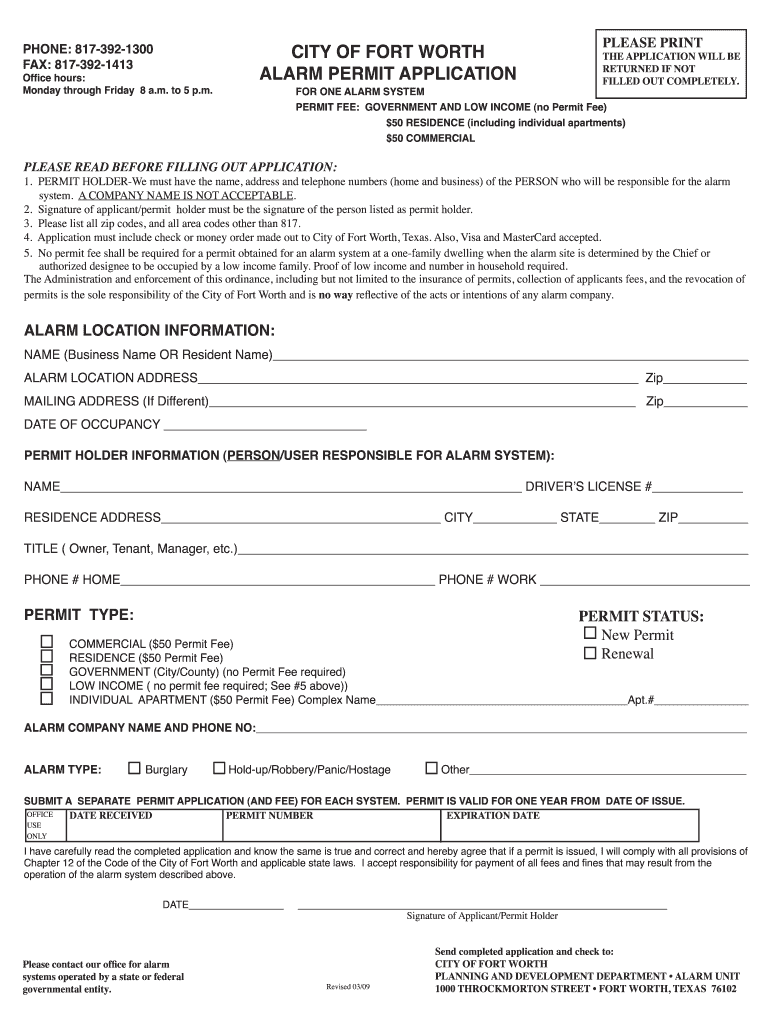
Code of the City of Fort Worth and applicable state laws. I accept responsibility for payment of all fees and fines that may result from the operation of the alarm system described above. DATE_________________ Please contact our office for alarm systems operated by a state or federal governmental entity. __________________________________________________________________ Signature of Applicant/Permit Holder Revised 03/09 Send completed application and check to: CITY OF FORT WORTH PLANNI.
Loading

Open form follow the instructions

Easily sign the form with your finger

Send filled & signed form or save
How to fill out the TX Fort Worth Alarm Permit App - Fort Worth online
The TX Fort Worth Alarm Permit Application is essential for individuals and businesses looking to set up alarm systems in Fort Worth. This guide will provide clear, step-by-step instructions on how to complete the application effectively and ensure compliance with local regulations.
Follow the steps to successfully fill out the form online.
- Click 'Get Form' button to obtain the form and open it in the editor.
- Begin by providing permission holder information. Enter the name, address, and telephone numbers (both home and work) of the person who will be responsible for the alarm system. Note that a company name is not acceptable.
- Fill in the alarm location information by entering either the business name or resident name, followed by the complete alarm location address. Include the zip code for the address.
- If the mailing address differs from the alarm location, specify the mailing address along with its zip code.
- Indicate the date of occupancy for the alarm location.
- Select the permit status by choosing either 'New Permit' or 'Renewal'.
- Choose the permit type and corresponding permit fee applicable to your situation. Options include residential, commercial, government, low income, and individual apartment.
- Provide the name and phone number of the alarm company, if applicable.
- Identify the type of alarm you have by checking the relevant boxes for burglary, hold-up, robbery, panic, hostage, or other.
- Review the completed application carefully to ensure all fields are filled out completely. The application will be returned if it is not complete.
- Sign the application acknowledging your agreement to comply with all relevant laws and regulations.
- Prepare your payment. Include a check or money order made out to the City of Fort Worth, or be ready to provide credit card information.
- Submit the application with the payment to the City of Fort Worth's Planning and Development Department, Alarm Unit.
- Once submitted, you can save changes, download, print, or share the completed form.
Complete your alarm permit application online today to ensure compliance and security for your alarm systems.
Experience a faster way to fill out and sign forms on the web. Access the most extensive library of templates available.
Related content
Alarm system users will now be able to register and/or renew alarm systems, pay fees...
Fort Worth False Alarm Management System is an essential program designed to reduce the...
Tap to display the clock alarm screen. 2. Tap on an alarm button (total of 5 to select...
Get answers to your most pressing questions about US Legal Forms API.
What is an alarm certificate and why would a customer need it?
An alarm certificate serves as proof that you possess a valid alarm permit for your system. Many insurance companies require this documentation to ensure coverage in case of theft or damage. Holding an alarm certificate can streamline interactions with emergency services during alarm incidents. You can easily obtain the necessary documentation through the TX Fort Worth Alarm Permit App - Fort Worth.
Does Texas require an alarm permit?
While Texas does not have a statewide alarm permit requirement, individual cities like Fort Worth do. Obtaining a permit not only complies with local laws but also ensures that emergency services are prepared for any alarms at your premises. The TX Fort Worth Alarm Permit App - Fort Worth is a helpful resource to navigate this licensing process.
What requires a permit in Fort Worth?
In Fort Worth, various activities require a permit, including security alarm systems, construction projects, and certain business operations. It’s essential to understand your local regulations to ensure compliance. If you are uncertain about specific permit needs for your alarm system, the TX Fort Worth Alarm Permit App - Fort Worth can clarify these requirements.
How do you find out if your car has an alarm?
You can determine if your car has an alarm by checking your vehicle's manual or looking for a security indicator light on your dashboard. Many modern vehicles come with built-in alarms that silently activate when locked. If unsure, contacting your car dealership may provide you with the necessary information. The TX Fort Worth Alarm Permit App - Fort Worth does not specifically cover car alarms, but it can guide you on residential alarm permits.
Do you need a permit for ADT?
Yes, if you have an ADT alarm system installed at your location in Fort Worth, you are still required to obtain an alarm permit. This ensures regulatory compliance and helps local authorities respond effectively to alarm activations. To expedite your application, you can utilize the TX Fort Worth Alarm Permit App - Fort Worth for guidance.
Do I need an alarm permit in Fort Worth, Texas?
Yes, if you have a security alarm system in Fort Worth, you typically need an alarm permit. This requirement helps the local authorities manage false alarms and enhance neighborhood security. You can easily apply for the necessary permit using the TX Fort Worth Alarm Permit App - Fort Worth, streamlining the process.
How do I find out my house alarm code?
Finding your house alarm code can usually be done by checking the user manual or contacting your alarm provider. If you've set up your alarm system online, you might also find your code in your account settings. Always keep this information secure, as it is essential for operating your alarm efficiently. For further assistance, the TX Fort Worth Alarm Permit App - Fort Worth can provide valuable resources.
Do you need a permit for an alarm system in Texas?
You need a permit for an alarm system in Texas if the system connects with local emergency services. This rule applies to both residential and commercial alarms. Permitting guarantees that first responders can effectively address emergencies without confusion from false alarms. To streamline the process, consider using the TX Fort Worth Alarm Permit App - Fort Worth for quick guidance.
Do you need a license to sell alarms in Texas?
Yes, you need a license to sell alarm systems in Texas. This requirement ensures that those selling alarm systems meet certain legal and safety standards. To obtain a license, you must complete specific training and meet state regulations. If you are looking to sell alarms in Fort Worth, consult the TX Fort Worth Alarm Permit App - Fort Worth for updated local guidelines.
Do you need a permit for SimpliSafe?
SimpliSafe systems typically require a permit in jurisdictions that have alarm regulations, including parts of Texas. Since permits help ensure proper response by law enforcement, it's wise to check local rules. The TX Fort Worth Alarm Permit App - Fort Worth makes acquiring this permit a straightforward process for SimpliSafe users.
Use professional pre-built templates to fill in and sign documents online faster. Get access to thousands of forms.
If you believe that this page should be taken down, please follow our DMCA take down process here.