Loading
Get Ameritas Vision Reimbursement Form
How it works
-

Open form follow the instructions
-

Easily sign the form with your finger
-

Send filled & signed form or save
How to fill out the Ameritas Vision Reimbursement Form online
Completing the Ameritas Vision Reimbursement Form online can streamline the process of submitting a claim for vision benefits. This guide provides step-by-step instructions for filling out the form accurately and efficiently.
Follow the steps to complete your Ameritas Vision Reimbursement Form
- Use the ‘Get Form’ button to access the Ameritas Vision Reimbursement Form and open it in your preferred online editor.
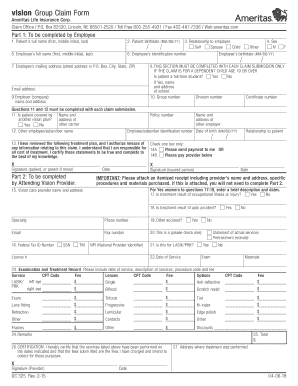
- Begin by filling out Part 1, which is for the employee. Enter the patient’s full name, including their first, middle initial, and last name.
- Complete the relationship section by selecting the appropriate option: Self, Spouse, or Child.
- Fill in the employee's mailing address, including street address or P.O. Box, city, state, and ZIP code. Don’t forget to add the email address.
- Make sure to answer questions 11 and 12 regarding coverage by another vision plan and if the patient is a full-time student, respectively.
- In the certification section, confirm that the treatment plan has been reviewed, check the appropriate box for payment, and ensure you include your signature and date.
- Once all relevant fields are filled, review the entire form for accuracy. After reviewing, you can save changes, download, print, or share the completed form as necessary.
Complete your Ameritas Vision Reimbursement Form online today for a seamless claims experience.
Ameritas Life Insurance Corp. Group Claim Office / P.O. Box 82520 / Lincoln, NE 68501-2520 / Toll Free 800-487-5553 / Fax 402-467-7336 / Web ameritas.com Ameritas' payer ID for electronic claims is 47009.