Loading
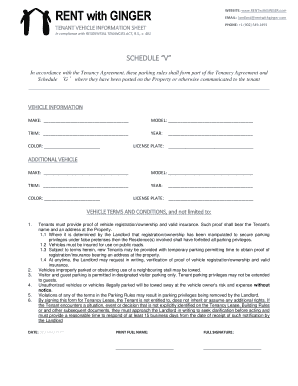
Get Vehicle Information Sheet - Rentwithginger
How it works
-

Open form follow the instructions
-

Easily sign the form with your finger
-

Send filled & signed form or save
How to fill out the Vehicle Information Sheet - RENTwithGINGER online
Filling out the Vehicle Information Sheet - RENTwithGINGER online is a straightforward process that helps ensure compliance with parking rules. This guide will walk you through each step required to complete the form accurately.
Follow the steps to complete the form effectively.
- Click the ‘Get Form’ button to access the Vehicle Information Sheet - RENTwithGINGER and open it in your browser's editor.
- Begin by entering the vehicle’s make in the designated field. This typically refers to the manufacturer of the vehicle (e.g., Toyota, Honda).
- Next, fill in the model of the vehicle, which specifies the version of the make you are using (e.g., Camry, Accord).
- Proceed to input the trim level of your vehicle, which may include details on the features or specifications. If unsure, you may leave this field blank.
- Enter the year of manufacture for your vehicle. This should correspond to the model year.
- Input the color of your vehicle in the appropriate field. Be specific about the shade if applicable.
- Fill in the license plate number of your vehicle to ensure accurate identification.
- If applicable, repeat the above steps to fill out information for an additional vehicle by using the second set of fields provided.
- Review the vehicle terms and conditions section. Ensure that you understand the requirements for proof of registration and insurance before submitting the form.
- Finally, enter the date, print your full name, and provide your signature in the designated areas to complete the form.
- Once all fields are completed, you may save your changes, download, print, or share the form as necessary.
Start filling out your Vehicle Information Sheet online to ensure compliance and secure your parking privileges.