Loading
Get Ashworth College Student Portal
How it works
-

Open form follow the instructions
-

Easily sign the form with your finger
-

Send filled & signed form or save
How to use or fill out the Ashworth College Student Portal online
Filling out the Ashworth College Student Portal is an essential step for students to manage their academic journey efficiently. This guide provides a comprehensive overview of how to navigate the portal and complete forms like the Proctor Nomination Form seamlessly.
Follow the steps to fill out the Proctor Nomination Form online
- Press the ‘Get Form’ button to access the Proctor Nomination Form. This step allows you to obtain the necessary document to proceed with your nomination.
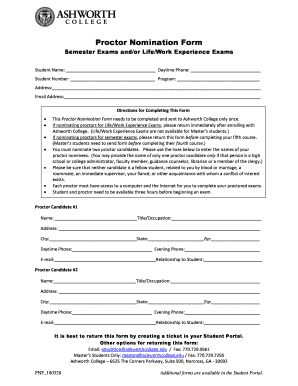
- Enter your personal information. This includes your name, student number, program, address, daytime phone, and email address. Ensure all details are accurate to facilitate effective communication.
- Nominate your proctor candidates. You must provide names for two proctor candidates. If one candidate is a high school or college administrator, you may submit only their name.
- Fill in the details for each proctor candidate. This includes their name, title or occupation, address, city, state, zip code, daytime phone, evening phone, email, and their relationship to you. Be mindful of the provided guidelines regarding conflicts of interest.
- Review the completed form to ensure all sections are filled accurately. Check for any typographical errors or omissions that may delay the processing of your nomination.
- Submit your completed form through your Student Portal by creating a support ticket. As alternatives, you may also email or fax your completed form to the appropriate contacts provided.
- Once submitted, keep a copy of the form for your records. You may also want to monitor your email for confirmation from the college.
Take the next step in your academic journey by completing your documents online today.
You must obtain a 60% to pass a course or lesson. For semester exams, the minimum passing score is 70%. If you don't pass all sections of the exam you may retake the failed sections once. For each section failed on the first attempt, you're allowed 36 minutes on the retake attempt.