Loading
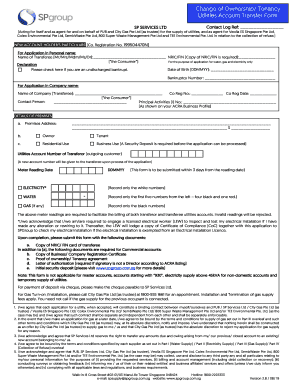
Get Sg Spgroup Change Of Ownership/tenancy Utilities Account Transfer Form 2019
How it works
-

Open form follow the instructions
-

Easily sign the form with your finger
-

Send filled & signed form or save
How to fill out the SG SPgroup Change Of Ownership/Tenancy Utilities Account Transfer Form online
Filling out the SG SPgroup Change Of Ownership/Tenancy Utilities Account Transfer Form is a crucial step when transferring utility accounts. This guide will provide you with clear, step-by-step instructions on how to accurately complete the form online, ensuring a smooth and efficient transfer process.
Follow the steps to complete your utilities account transfer form online.
- Click ‘Get Form’ button to obtain the form and open it in your preferred editor.
- Begin by entering the new account holder’s particulars. For personal applications, fill in the name of the transferee, along with their NRIC or FIN number. If applicable, provide a copy of the relevant identification document.
- If the application is for a business, input the company name along with the company registration number and date. Specify a contact person and include the principal activities number as shown on your ACRA Business Profile.
- Next, provide the details of the premises. This includes the complete address and specify whether you are the owner or tenant of the premises.
- Indicate whether the premises will be used for residential or business purposes. Note that a security deposit is required for business use.
- Fill in the utility account number of the outgoing customer and provide the meter reading date, making sure to record only the necessary numbers as detailed for each utility type.
- Complete the acknowledgment section regarding the need for electrical inspections if alterations were made. This ensures compliance and safety.
- Finally, submit the filled form along with the required documents, which may include identification copies and business documentation if applicable.
- After completing and reviewing the form, you can save your changes, download, print, or share the document as needed.
Complete your utilities account transfer form online today for a hassle-free transition!
Get form
Experience a faster way to fill out and sign forms on the web. Access the most extensive library of templates available.
To switch back to SP Group, you will first need to end your current service with your existing provider. After that, reach out to SP Group to express your interest and review any terms involved. Use the SG SPgroup Change Of Ownership/Tenancy Utilities Account Transfer Form to facilitate a smooth transition, ensuring you stay updated throughout the process.
Get This Form Now!
Use professional pre-built templates to fill in and sign documents online faster. Get access to thousands of forms.
Industry-leading security and compliance
US Legal Forms protects your data by complying with industry-specific security standards.
-
In businnes since 199725+ years providing professional legal documents.
-
Accredited businessGuarantees that a business meets BBB accreditation standards in the US and Canada.
-
Secured by BraintreeValidated Level 1 PCI DSS compliant payment gateway that accepts most major credit and debit card brands from across the globe.