Loading
Get Authorization For Release Of Health Information ... - Northwell Health
How it works
-

Open form follow the instructions
-

Easily sign the form with your finger
-

Send filled & signed form or save
How to fill out the Authorization for Release of Health Information - Northwell Health online
Filling out the Authorization for Release of Health Information is an essential process for individuals seeking access to their health records. This guide provides clear, step-by-step instructions on how to complete the form accurately to ensure that your health information is released in accordance with your preferences.
Follow the steps to complete the form correctly.
- Press the ‘Get Form’ button to obtain the form and open it for editing.
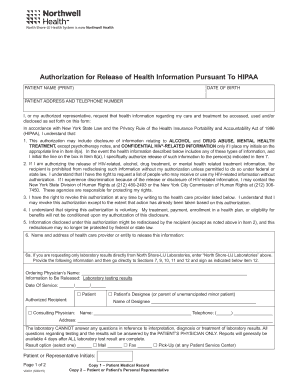
- Begin by entering the patient name in the designated field, followed by the date of birth to clearly identify the individual whose information is being requested.
- Fill in the patient’s address and telephone number. This ensures that all communications can be directed appropriately.
- In the section that requests authorization, read the explanation carefully, as it includes important details about the information being released. Ensure that you initial the box if you wish to include sensitive information, such as details regarding mental health or HIV-related information.
- Provide the name and contact details of the healthcare provider or entity from which the information is to be released. If only laboratory results are requested, indicate 'North Shore-LIJ Laboratories' in the specified field.
- If the information to be released includes laboratory results, fill in the ordering physician’s name and specify the date of service for the records you wish to access.
- Indicate the recipient of the information by selecting the appropriate option (e.g., patient, designee, consulting physician) and provide their name and contact details.
- Choose how you would like to receive the information: via mail, fax, or pick-up at a Patient Service Center. Select one and mark it clearly.
- In the required fields, list the name, address, and contact numbers of the person or category of person to whom the information will be sent.
- Specify the type of information that is to be released by selecting from the available options. If there is any specific information, denote it using initials.
- State the reason for the release of information in the provided field to clarify the context of your request.
- Complete the expiration date of the authorization to indicate how long this permission remains valid.
- Finally, sign the form, including the printed name and your relationship to the patient if applicable. Ensure all required signatures are obtained, including those of any necessary interpreters or witnesses.
- Once you have filled out the form completely, save any changes, download a copy, print it for your records, or share it as needed.
Begin completing your Authorization for Release of Health Information form online today for a simpler, more efficient process.
To update or make changes to this information, you'll need to visit your provider's office and provide official documentation supporting the change, such as a birth certificate, license or marriage certificate. If you have questions, please contact your provider's office directly.
Industry-leading security and compliance
US Legal Forms protects your data by complying with industry-specific security standards.
-
In businnes since 199725+ years providing professional legal documents.
-
Accredited businessGuarantees that a business meets BBB accreditation standards in the US and Canada.
-
Secured by BraintreeValidated Level 1 PCI DSS compliant payment gateway that accepts most major credit and debit card brands from across the globe.