Loading
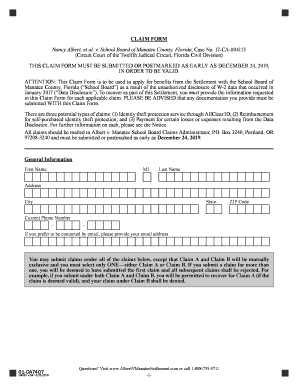
Get Claim Form - Albert V. Manatee Settlement
How it works
-

Open form follow the instructions
-

Easily sign the form with your finger
-

Send filled & signed form or save
How to fill out the Claim Form - Albert V. Manatee Settlement online
This guide provides clear and supportive instructions on how to complete the Claim Form for the Albert V. Manatee Settlement online. Following these steps will help ensure that your information is accurately submitted for consideration.
Follow the steps to complete your claim form easily.
- Press the ‘Get Form’ button to access the Claim Form - Albert V. Manatee Settlement and open it in your document editor.
- Begin by entering your personal information in the General Information section. Provide your first name, middle initial (MI), last name, address, city, state, ZIP code, and current phone number. If preferred, include your email address for correspondence.
- Choose the type of claim you wish to submit. You may select only one claim between Claim A (False/Fraudulent Tax Return) and Claim B (Unauthorized IRS Tax Transcript). Claims A and B are mutually exclusive, so ensure to select only one option.
- If you are submitting Claim A, attest to having a false or fraudulent tax return filed after January 26, 2017, and provide the necessary documentation with your Claim Form. If submitting Claim B, confirm the unauthorized request of an IRS tax transcript and submit the relevant documentation.
- For Claim C (Identity Theft), attest to experiencing an identity theft incident and provide the supporting documentation. Ensure you have not experienced prior incidents of identity theft in the three years preceding 2017.
- If you are submitting Claim D for out-of-pocket expenses, provide details about the expenses incurred due to the Data Disclosure. List the expenses, their dates, and include supporting documentation as needed. Be sure to also attest to spending time dealing with the consequences of the Data Disclosure.
- If applicable, fill out the section for Self-Purchased Identity Theft Protection by entering the date of purchase, name of the service, cost, and amount of reimbursement you are claiming. Provide documentation that supports your claim.
- Confirm your enrollment in AllClear ID if you did not previously register. Select the option that applies to your situation regarding identity theft protection services.
- Complete the certification section at the end of the Claim Form by checking the box to declare that the information provided is true and correct under penalty of perjury. Sign and date the form.
- Review the Claim Form for accuracy. Once complete, save your changes, and download, print, or share the form as necessary before submitting it through the specified mailing address.
Take action now and submit your Claim Form online to ensure your eligibility for settlement benefits.
Industry-leading security and compliance
US Legal Forms protects your data by complying with industry-specific security standards.
-
In businnes since 199725+ years providing professional legal documents.
-
Accredited businessGuarantees that a business meets BBB accreditation standards in the US and Canada.
-
Secured by BraintreeValidated Level 1 PCI DSS compliant payment gateway that accepts most major credit and debit card brands from across the globe.