Loading
Get Tufts Esp Notification Form
How it works
-

Open form follow the instructions
-

Easily sign the form with your finger
-

Send filled & signed form or save
How to fill out the Tufts Esp Notification Form online
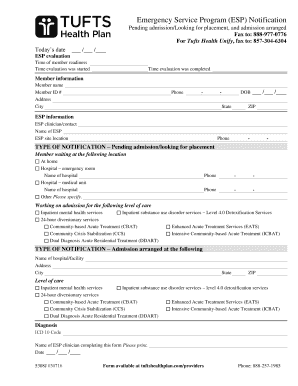
This guide provides step-by-step instructions for users on how to effectively fill out the Tufts Esp Notification Form online. Whether you are preparing for a pending admission or have already arranged an admission, this guide will navigate you through each section with clarity.
Follow the steps to complete the Tufts Esp Notification Form.
- Click ‘Get Form’ button to obtain the form and open it in the editor.
- Enter today's date in the designated field. Make sure you format it as MM/DD/YYYY for consistency.
- Complete the ESP evaluation section by entering the time of member readiness, the time evaluation was started, and the time evaluation was completed.
- Fill out the member information fields, including the member's name, ID number, address, city, state, ZIP code, phone number, and date of birth.
- In the ESP information section, provide the name of the ESP clinician or contact, the ESP name, site location, and contact phone number.
- Select the type of notification by indicating whether it is pending admission, looking for placement, or if an admission has been arranged.
- Indicate the member's current location by checking the appropriate box, such as at home, in a hospital emergency room, or other specified location including the name of the hospital if applicable.
- List the level of care for which admission is being arranged. Options may include inpatient mental health services or various substance use disorder services.
- If admission has been arranged, provide the name and address of the hospital or facility, including city, state, and ZIP code.
- Specify the diagnosis by including the relevant ICD 10 code.
- Print your name as the ESP clinician completing this form, and enter the date at the bottom of the form.
- Once all information is accurately filled, you may save changes, download, print, or share the form as required.
Complete your forms online seamlessly and manage your documents efficiently.