Loading
Get Canada Ci1 2009-2026
How it works
-

Open form follow the instructions
-

Easily sign the form with your finger
-

Send filled & signed form or save
How to fill out the Canada CI1 online
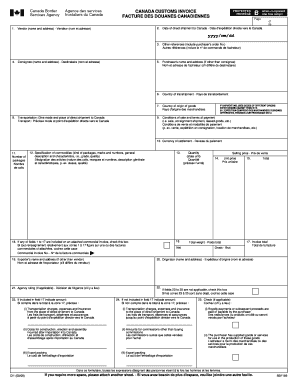
The Canada Customs Invoice CI1 is a vital document used for customs purposes when importing goods into Canada. This guide will provide you with step-by-step instructions on how to accurately fill out the CI1 online to ensure a smooth customs process.
Follow the steps to complete the Canada CI1 form online
- Click ‘Get Form’ button to obtain the form and open it in the editor.
- Provide the vendor's name and complete address in the designated field. Ensure that the details are accurate to avoid any issues during customs processing.
- Enter the date of direct shipment to Canada using the format yyyy/mm/dd.
- Fill in the consignee's name and address, which is the individual or entity receiving the goods.
- Indicate the mode of transportation and the place of direct shipment to Canada.
- Record any other references, such as the purchaser's order number, in the relevant field.
- If applicable, provide the purchaser's name and address, especially if it differs from the consignee.
- Specify the country of transshipment, if applicable, and the country of origin of the goods.
- Outline the conditions of sale and terms of payment, specifying if it's a sale, consignment shipment, or leased goods.
- Indicate the currency of settlement for the transaction.
- Fill in the number of packages being shipped.
- Provide a detailed specification of the commodities, including package type, marks, numbers, and a general description.
- Enter the quantity of the goods, ensuring to specify the unit of measurement used.
- Fill in the selling price for the goods being imported.
- Record the unit price for each item listed.
- Indicate the total weight of the shipments, both net and gross.
- Complete the invoice total based on the provided information.
- If the exporter’s name and address differ from the vendor, provide those details.
- Fill in the originator's name and address, if it differs from the vendor.
- If applicable, provide the agency ruling associated with the shipment.
- Check the applicable box if fields 1 to 17 are included in an attached commercial invoice.
- If necessary, specify any amounts related to fields 23 to 25, noting transportation charges and other relevant costs.
- If more space is needed, attach an additional sheet as required.
- Review the completed form for accuracy before proceeding.
- Once all fields are filled in correctly, you can save changes, download the form, print it, or share it as needed.
Complete your Canada CI1 form online today for an efficient customs process.
Related links form
Filling out a biometric consent form for Canada requires you to provide accurate personal information and specify what you are consenting to. Carefully review the instructions included with the form to ensure you meet all standards. For further help, consult the US Legal Forms platform, which offers useful resources tailored to Canada CI1.