Loading
Get Master Data Form
How it works
-

Open form follow the instructions
-

Easily sign the form with your finger
-

Send filled & signed form or save
How to fill out the Master Data Form online
Completing the Master Data Form online is a straightforward process that ensures your information is accurately captured. This guide provides clear steps to help users navigate each section of the form effectively.
Follow the steps to complete the Master Data Form online.
- Click the ‘Get Form’ button to access the Master Data Form. This will download the form so you can start filling it out in your preferred online format.
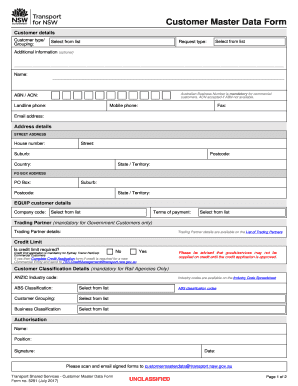
- Begin by entering customer details. This includes selecting the customer type/grouping from the provided list and specifying the request type. If there's additional information you wish to provide, you can do so in the designated optional field.
- Fill in the required fields for the customer’s name, Australian Business Number (ABN), or Australian Company Number (ACN) if applicable. Keep in mind that Listing the ABN is mandatory for commercial customers.
- Provide contact information by entering the landline phone, mobile phone, fax, and email address of the customer.
- Complete the address details by entering the street address, including the house number, suburb, postcode, state/territory, and country. If there is a PO Box address, fill in the respective fields as well.
- For EQUIP customer details, select the company code and terms of payment from the respective lists provided. If applicable, fill in the trading partner details and ensure to reference the List of Trading Partners.
- If a credit limit is required, indicate your preference. If the answer is yes, you will need to complete the Credit Application form and send it as instructed. Remember, no goods or services will be supplied on credit until the application is approved.
- Complete the Customer Classification Details if you are a Rail Agency. Choose the ANZIC Industry code and fill in the corresponding ABS classification, customer grouping, and business classification from the available lists.
- In the authorization section, provide your name, position, date, and ensure to add your signature. Once all fields are filled out, scan the signed form.
- Finally, save the changes made to the document. You can then download the filled form, print it for your records, or share it as required. Ensure that the completed document is emailed to the specified address for processing.
Start filling out the Master Data Form online today to ensure accurate and efficient data management.
Customer information—such as names, phone numbers, and addresses—is an excellent example of master data. This data is less volatile but occasionally needs to be updated when a customer moves or changes their name.