Loading
Get Ae-mtx-0200.fm
How it works
-

Open form follow the instructions
-

Easily sign the form with your finger
-

Send filled & signed form or save
How to fill out the AE-MTX-0200.fm online
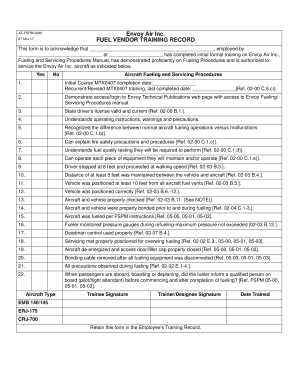
Filling out the AE-MTX-0200.fm form is essential for acknowledging that a user has completed their initial formal training in fueling and servicing procedures at Envoy Air Inc. This guide offers a clear, step-by-step approach to assist you in accurately completing the form online.
Follow the steps to successfully complete the AE-MTX-0200.fm form.
- Click the ‘Get Form’ button to open the AE-MTX-0200.fm form in your preferred online editor.
- Begin by entering the name of the person who has completed the training in the designated space.
- Fill in the name of the employer in the appropriate section.
- Next, provide the location where the individual has completed the training.
- Complete the initial course completion date for MTX0407, as well as the date for any recurrent or revised training.
- Indicate whether the trainee has demonstrated access to the Envoy Technical Publications web page.
- Confirm that the trainee's driver's license is valid and current in the specified field.
- Ensure that the trainee understands operating instructions and safety precautions.
- Describe the trainee's understanding of normal aircraft fueling operations and potential malfunctions.
- Outline the fire safety precautions that the trainee can explain.
- Provide details about the fuel quality tests the trainee will be required to perform.
- Confirm that the trainee can operate all equipment they will maintain or operate.
- Check that the trainee followed distance and positioning guidelines as required during fueling.
- Make sure proper bonding procedures were followed before and during fueling.
- Confirm that fueling was conducted in accordance with FSPM instructions.
- Document that the fueler monitored the pressure gauges during the refueling process.
- Ensure that deadman control was used correctly.
- Provide verification that the servicing mat was positioned correctly for overwing fueling.
- Confirm that the aircraft was de-energized and the access door/filler cap was properly closed.
- Document the removal of the bonding cable after disconnecting all fueling equipment.
- Check that all precautions were observed during the fueling process.
- Finally, indicate whether the fueler informed a qualified person on board before and after fueling when passengers were aboard.
- Collect signatures from both the trainee and trainer/designee, and note the date the training occurred.
- Once all fields are completed, save your changes, download the form for your records, or print and share as needed.
Complete the AE-MTX-0200.fm form online today to ensure accurate training records.