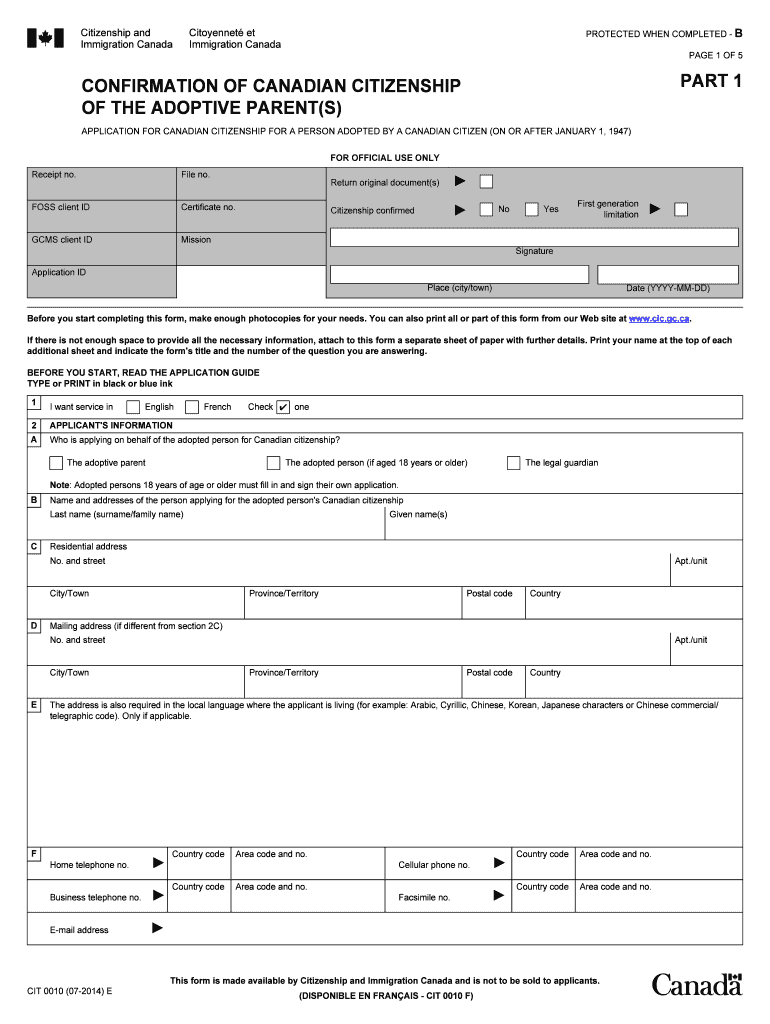
If there is not enough space to provide all the necessary information, attach to this form a separate sheet of paper with further details. Print your name at the top .
Loading

Open form follow the instructions

Easily sign the form with your finger

Send filled & signed form or save
How to fill out the Canada CIT 0010 E online
Filling out the Canada CIT 0010 E form is a crucial step in the citizenship application process for adopted persons. This guide will provide you with comprehensive, step-by-step instructions to ensure that your application is completed accurately and efficiently.
Follow the steps to complete your Canada CIT 0010 E form online.
- Click the ‘Get Form’ button to access the form and open it in the online editor.
- Begin by confirming the Canadian citizenship of the adoptive parent(s). Indicate if the citizenship is confirmed and if applicable, fill out the required details, such as the adoption file number and the receipt number.
- Provide the name and addresses of the person applying on behalf of the adopted person. This may be the adoptive parent, the adopted person (if aged 18 or older), or the legal guardian.
- Fill out the details of the adoptive parent(s). Include their last name, given names, other names used, Canadian citizenship information, and any relevant employment details.
- Complete the section detailing the adoption. Answer whether the adoption has been completed and provide additional details regarding the adoption order.
- Provide the personal details of the adopted person, including their last name at birth, place of birth, date of birth, and current citizenship information.
- If applicable, complete the section regarding assistance received in filling out this form. This step is for individuals, firms, or organizations that have helped in the application process.
- Finally, read through the declaration, sign the application within the designated area, and date your application to confirm that all information provided is accurate.
- Once completed, you can save the changes, download, print, or share the form as needed.
Begin filling out your Canada CIT 0010 E form online today to ensure your adoption process moves forward smoothly.
Experience a faster way to fill out and sign forms on the web. Access the most extensive library of templates available.
Related content
Mar 28, 2023 — This rule amends existing Department of Homeland Security ("DHS") and...
CANADIAN SYLLABICS E, ᐁ. 0x1402, 5122, CANADIAN SYLLABICS AAI, ᐂ. 0x1403, 5123 ... YI...
Get answers to your most pressing questions about US Legal Forms API.
How do I get into Canada as a US citizen?
As a US citizen, you can enter Canada by ensuring you have a valid passport and meeting the eTA requirement for air travel. If you are arriving by land or sea, no eTA is necessary, but having your passport is essential. Be ready to answer questions about your travel plans to border officials upon arrival.
How to apply for Canada Express Entry program?
Applying for the Canada Express Entry program involves creating an online profile on the IRCC website. You will need to provide detailed information about your work experience, skills, and education. Once your profile is submitted, you will enter a pool of candidates and may be selected to apply for permanent residency based on your comprehensive ranking score.
How do I get an express entry number in Canada?
To obtain an express entry number in Canada, you must first create an online profile through the Immigration, Refugees and Citizenship Canada (IRCC) portal. Your profile will be assessed based on various factors, including age, education, work experience, and language proficiency. If you meet the criteria, you will receive your express entry number, allowing you to proceed with your application.
How long does it take to get an electronic travel authorization in Canada?
The processing time for an electronic travel authorization in Canada typically ranges from minutes to a few days. Most applications are processed quickly, and you will receive an email confirming the status of your eTA shortly after submission. However, it's advisable to apply well in advance of your travel plans to avoid any last-minute issues.
How do I get a biometric instruction letter in Canada?
You can obtain a biometric instruction letter in Canada by submitting your application for a visa or immigration, which will trigger the issuance of this letter. Once your application is reviewed, you will receive the letter detailing where and how to give your biometrics. Keep in mind that providing biometrics is an essential step in the Canada CIT 0010 E process.
How to apply for electronic travel authorization to Canada?
To apply for an electronic travel authorization to Canada, you need to visit the official Government of Canada website. Fill out the application form honestly and completely, providing the necessary details such as your travel information and passport data. After submitting your application, you may receive a decision in a matter of minutes to a few days, depending on your individual case.
How do I declare US income in Canada?
To declare U.S. income in Canada, you must report your global income on your Canadian tax return. This includes any funds earned in the U.S. and may require currency conversion. Utilizing resources like USLegalForms can assist you in navigating the complexities associated with the Canada CIT 0010 E and ensuring your reporting is effective.
How to fill out the W-8BEN form?
Filling out the W-8BEN form involves providing your name, address, and taxpayer identification number. You must also confirm your non-U.S. status and any benefits under a tax treaty, if applicable. Ensure your responses align with requirements like those found under the Canada CIT 0010 E to avoid complications.
Do Canadians need a W8 Ben?
Yes, Canadians may need to complete a W8 BEN form if they receive income from U.S. sources and want to claim a reduced withholding tax rate. This form certifies your status as a foreign individual, which is crucial for US tax compliance. Proper understanding of the Canada CIT 0010 E requirements can aid in this process.
How to fill out a w8ben form in Canada?
When filling out a W8BEN form in Canada, start by entering your name and citizen details in the designated fields. You will also need to declare your foreign status and tax information accurately. Referencing guidance from providers like USLegalForms can ensure that your submission aligns with the Canada CIT 0010 E standards.
Use professional pre-built templates to fill in and sign documents online faster. Get access to thousands of forms.
If you believe that this page should be taken down, please follow our DMCA take down process here.