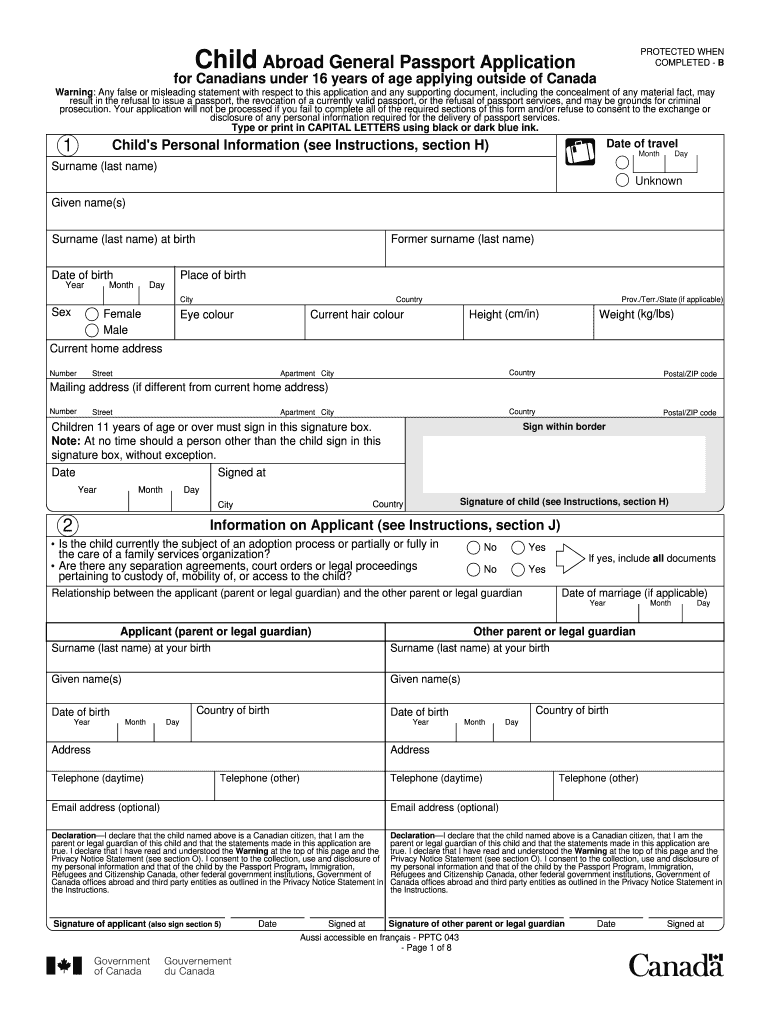
with respect to this application and any supporting document, including the concealment of any material fact, may result in the refusal to issue a passport, the revocation of a currently valid passport, or the refusal of passport services, and may be grounds for criminal prosecution. Your application will not be processed if you fail to complete all of the required sections of this form and/or refuse to consent to the exchange or disclosure of any personal information required for the delivery .
Loading

Open form follow the instructions

Easily sign the form with your finger

Send filled & signed form or save
How to fill out the Canada Child Abroad General Passport Application online
Filling out the Canada Child Abroad General Passport Application online is essential for Canadians under 16 years of age applying from outside of Canada. This guide provides step-by-step instructions to help users complete the form accurately and efficiently.
Follow the steps to successfully complete your application.
- Press the ‘Get Form’ button to access the application document and open it for editing.
- Fill in the date of travel as specified in the relevant section of the form.
- Provide the child's personal information, including their surname, given names, date of birth, place of birth, sex, eye color, height, weight, and current home address.
- If the child is 11 years or older, they must sign the designated signature box on the form. Ensure the signature is within the specified border.
- Complete the section on information regarding the applicant, which includes the relationship to the child, contact details, and declarations regarding custody or adoption processes.
- Document the child's previous Canadian travel document information if applicable, including the date of issue and passport number.
- Provide proof of Canadian citizenship by selecting and submitting one of the accepted documents.
- If required, fill in the declaration of the guarantor, confirming identity and knowledge of the child.
- You may optionally provide emergency contact information for future reference.
- Review all entered information for accuracy. After ensuring completion, save the changes, and you can download, print, or share the application as needed.
Complete your Canada Child Abroad General Passport Application online today.
Experience a faster way to fill out and sign forms on the web. Access the most extensive library of templates available.
Related content
You are renewing a U.S. passport that was issued while you were under the age of 16. We...
INVITING FAMILY MEMBERS TO ATTEND YOUR GRADUATION CEREMONY · Copy of the Applicant's...
May 20, 2025 — When applying for a passport from abroad, the application form is sent to...
Get answers to your most pressing questions about US Legal Forms API.
Are both parents' signatures required for a child's passport?
Yes, both parents' signatures are required for a child’s passport application, including the Canada Child Abroad General Passport Application. This ensures that both parties consent to the issuance of the passport for your child. In cases where one parent cannot be present, providing a signed consent form can help resolve the issue. Make sure to follow all guidelines to facilitate smooth processing.
Can Canadian children travel to the US without a passport?
Canadian children generally need a passport to travel to the US. However, if they are under the age of 16, they may also be able to travel with a birth certificate and, depending on the situation, other forms of identification. For traveling abroad, it’s best to apply for the Canada Child Abroad General Passport Application to avoid any issues at the border. Always stay updated on travel requirements to ensure a smooth journey.
Do both parents need to be present for passport renewal?
For renewing a child’s passport, ideally, both parents should be present at the time of application. This helps confirm consent and streamlines the process, especially for the Canada Child Abroad General Passport Application. If one parent cannot attend, a notarized letter of consent may suffice but check the specific requirements beforehand. Always verify current regulations to ensure compliance.
How to fill out parental information on a passport application?
To fill out parental information on the Canada Child Abroad General Passport Application, provide complete details about both parents. Include names, addresses, and contact information accurately. It is important to ensure that both parents’ information matches the identification documents you provide. Incomplete or mismatched information can lead to delays in processing your child's passport.
How do I renew my Canadian passport from the USA?
Renewing your Canadian passport from the USA involves submitting the proper forms through the mail or at a Canadian consulate. For a Canada Child Abroad General Passport Application, you'll need your child's existing passport as well as all required identification. Be aware of processing times and ensure you fill out the forms correctly to avoid delays. It’s advisable to use secure mailing options when sending sensitive documents.
Do I need a guarantor to renew my passport in Canada?
In Canada, a guarantor is necessary for standard passport applications, but this does not apply to renewals if you provide your previous passport. If you are in the process of submitting a Canada Child Abroad General Passport Application, refer to the latest application requirements. Make sure to also confirm your application type to ensure all criteria are met.
Do I need a guarantor for Canadian child passport renewal?
When renewing a Canada Child Abroad General Passport Application for your child, a guarantor is generally required. However, if you are renewing a passport for a child under 16, you can use the original passport as proof of identity. Ensure all documentation is accurate and complete to avoid delays. Always check the latest guidelines on the official Canadian government website for any updates.
Does my child need a passport to enter Canada from the US?
Yes, your child needs a passport to enter Canada from the U.S. It is crucial for travel across borders. The Canada Child Abroad General Passport Application serves as a vital tool for obtaining your child's passport and ensuring a smooth entry into Canada.
Can I apply for a Canadian passport outside Canada?
You can indeed apply for a Canadian passport from outside Canada. Ensure you visit the nearest Canadian embassy or consulate for proper guidance. Utilizing the Canada Child Abroad General Passport Application can make it easier to compile necessary documents and submit your application correctly.
Do both parents need to be present for a child passport in Canada?
Yes, for a child passport application in Canada, both parents typically need to be present unless specific exceptions are met. This requirement ensures joint consent for the child's passport application. The Canada Child Abroad General Passport Application outlines these requirements clearly, helping you prepare ahead.
Use professional pre-built templates to fill in and sign documents online faster. Get access to thousands of forms.
If you believe that this page should be taken down, please follow our DMCA take down process here.