Loading
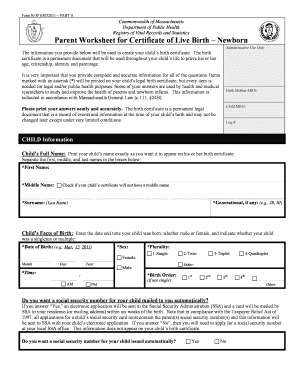
Get Form R-3wa-02012011 At-birth - Afa Obgyn
How it works
-

Open form follow the instructions
-

Easily sign the form with your finger
-

Send filled & signed form or save
How to fill out the Form R-3WA-02012011 At-Birth - Afa Obgyn online
Filling out the Form R-3WA-02012011 At-Birth - Afa Obgyn is an important process to ensure your child's birth information is accurately recorded. This guide provides clear, step-by-step instructions tailored for users of all experience levels to help you complete the form online effortlessly.
Follow the steps to successfully complete the form.
- Press the ‘Get Form’ button to access the form and open it in your preferred editing tool.
- Begin by filling out the fields for 'Child Information.' Enter your child's full name, separating the first, middle, and surname as required. Do not forget to include any generational identifiers if applicable.
- Next, provide the 'Child’s Facts of Birth.' Enter the date of birth, the sex of your child, and the time of birth. Specify whether your child is a singleton or multiple birth, and provide the birth order if applicable.
- Indicate whether you would like a social security number for your child mailed automatically. Choose 'Yes' or 'No' based on your preference.
- Proceed to complete the 'Confidential Information' section. This includes important data required by Massachusetts law, so be thorough and accurate.
- Navigate to the 'Mother/Parent Information' section. Enter the delivering parent's full legal name, contact numbers, and social security number. Provide your birth information as well, including the place of birth.
- Fill in the current marital status of the mother/parent. Ensure you follow the instructions carefully regarding paternity establishment according to your marital status.
- Provide both the residence and mailing addresses for the mother/parent. Double-check these addresses for accuracy–they may not be printed on the birth certificate but are crucial for contact purposes.
- Complete the 'Father/Parent Information' section similarly. Enter full names, social security numbers, and relevant birth details, ensuring to check the relationship with the mother/parent.
- Once all sections are filled out, review the entire form for any missing information or errors. Make corrections as necessary.
- Finally, save your changes, download the completed form, print a copy, or share it as required for submission.
Start filling out your documents online today to ensure your child's birth certificate is prepared accurately.
Industry-leading security and compliance
US Legal Forms protects your data by complying with industry-specific security standards.
-
In businnes since 199725+ years providing professional legal documents.
-
Accredited businessGuarantees that a business meets BBB accreditation standards in the US and Canada.
-
Secured by BraintreeValidated Level 1 PCI DSS compliant payment gateway that accepts most major credit and debit card brands from across the globe.