Loading
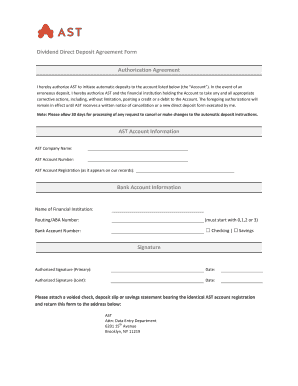
Get Dividend Direct Deposit Agreement Form Authorization ... - Ast
How it works
-

Open form follow the instructions
-

Easily sign the form with your finger
-

Send filled & signed form or save
How to fill out the Dividend Direct Deposit Agreement Form Authorization online
The Dividend Direct Deposit Agreement Form Authorization is a crucial document that allows for automated deposits to your bank account. This guide provides clear instructions to help you navigate each section of the form and complete it accurately to ensure timely processing.
Follow the steps to complete your form efficiently.
- Click the ‘Get Form’ button to obtain the form and open it in the editor.
- Begin with the AST account information section. Fill in the AST company name, AST account number, and AST account registration as it appears on your records. Ensure all details match your official documents.
- Move on to the bank account information section. Enter the name of the financial institution and ensure the routing/ABA number starts with 0, 1, 2, or 3. Then, input your bank account number.
- Select the type of bank account by checking either the 'Checking' or 'Savings' box to indicate the account type.
- In the signature section, provide the authorized signature for the primary account holder along with the date of signing. If applicable, include the signature of a joint account holder with the corresponding date.
- Attach a voided check, deposit slip, or savings statement that shows the identical AST account registration and return the form to the specified address.
- After filling out all fields, review the information for accuracy. You can then save changes, download, print, or share the completed form as needed.
Complete your Dividend Direct Deposit Agreement Form Authorization online today for a seamless banking experience.
Where can I get a direct deposit payroll form? From your Accounts page, select your chequing account. Select Direct Deposits & Payments. Go to Direct Deposit / Payroll Form and select View/Print.