Loading
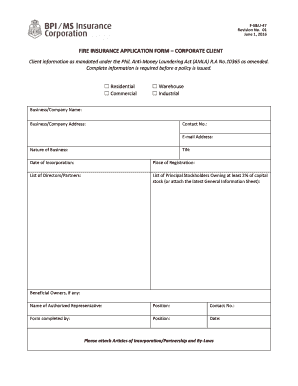
Get Fire Insurance Application Form Corporate Client
How it works
-

Open form follow the instructions
-

Easily sign the form with your finger
-

Send filled & signed form or save
How to fill out the FIRE INSURANCE APPLICATION FORM CORPORATE CLIENT online
Completing the Fire Insurance Application Form for corporate clients online is a straightforward process that ensures all required information is submitted accurately. This guide will take you through each section of the form, allowing for a smooth digital filing experience.
Follow the steps to complete your application form effectively.
- Click ‘Get Form’ button to obtain the form and open it in the editor.
- In the 'Client Information' section, select the type of property your company occupies, whether residential, commercial, warehouse, or industrial. Fill in the business or company name, address, contact number, and email address.
- Provide the nature of your business and enter your Tax Identification Number (TIN), date of incorporation, and place of registration.
- List the directors or partners associated with your business and include the principal stockholders who own at least 2% of the capital stock. If necessary, attach the latest General Information Sheet.
- Identify the beneficial owners, if applicable, along with the name and position of the authorized representative completing this form.
- In the 'Building' section, provide the address and a detailed description of the building to be insured, and include details such as the nearest landmark and the properties to be insured.
- Indicate the amount of insurance being applied for, the number of detached buildings, and the age of the building. Also specify if the property has a basement and the number of storeys.
- Fill in the total ground floor area and occupancy type. For commercial and industrial properties, describe the nature of the business or type of goods stored in warehouses.
- Specify the materials used for the roof and exterior walls. Provide information regarding the boundaries surrounding the property.
- List the contents and desired coverage options. Specify amounts and descriptions for items such as furniture, machinery, stocks, and any additional coverages required.
- Indicate if the property is mortgaged and provide details about the mortgagee. Choose the interest on the property from the given options.
- Answer questions related to past fire or other losses within the last five years, including the date and nature of those losses. Provide information about the previous insurance company as well.
- Complete the 'Utilities' section by specifying fueling sources and electrical details required for the property to be insured.
- In the 'Business Interruption' section, fill in how many shifts your plant operates, number of employees, and details about raw material stocks and production bottlenecks.
- Provide information regarding fire protection measures in place, including sprinklers, alarms, and any fire brigade availability.
- Complete the underwriting details, including agent information if available. Add your signature and date to confirm accuracy.
- Review the completed form thoroughly. Once satisfied, save your changes, and choose to download, print, or share the form as needed.
Start filling out the Fire Insurance Application Form online today to ensure your business is protected.
Related links form
The limit of the compensation is always subject to the sum insured and the terms and conditions that govern the policy. Principle of Indemnity is applicable in case of fire insurance and marine insurance contracts.