Loading
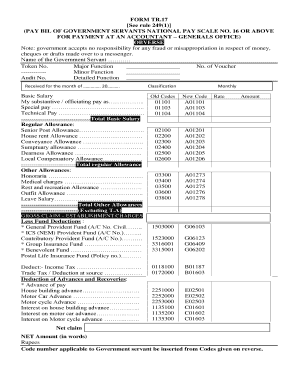
Get Tr 17
How it works
-

Open form follow the instructions
-

Easily sign the form with your finger
-

Send filled & signed form or save
How to fill out the Tr 17 online
Filling out the Tr 17 form online is an essential process for government servants wishing to submit their pay bills. This guide provides a detailed, step-by-step approach to ensure that you complete the form accurately and efficiently, regardless of your prior experience with legal documents.
Follow the steps to successfully fill out the Tr 17 form.
- Press the ‘Get Form’ button to access the Tr 17 form and open it in your preferred online editor.
- Begin by entering the name of the government servant in the appropriate field, followed by the token number, major function, and the voucher number. Ensure that each field is filled accurately to avoid processing delays.
- In the next section, specify the month for which the pay is being claimed. Enter the year clearly to avoid confusion.
- Detail the basic salary by specifying the substantive or officiating pay, along with any special or technical pay. Sum these amounts for the total basic salary.
- List the regular allowances such as senior post allowance, house rent allowance, and any other applicable allowances. Calculate the total of these allowances.
- Include other allowances if applicable, like honoraria, medical charges, or outfit allowance. Provide a total for these additional allowances.
- In the classification section, select the monthly category and enter the appropriate old codes and new codes related to the government servant.
- Calculate the gross claim for establishment charges and list any fund deductions like provident fund, insurance, and tax deductions.
- Determine the net claim by subtracting the total deductions from the gross claim. Clearly write the net amount in both numbers and words.
- Complete the certification section confirming the provided accommodation details and marital status. Sign and date the form where required.
- Finally, review the entire form for accuracy. Upon completion, save changes, and proceed to download, print, or share the Tr 17 form as necessary for submission.
Complete your Tr 17 form online for efficient processing of your pay bill.
Scoot flight TR390 - Flightradar24.