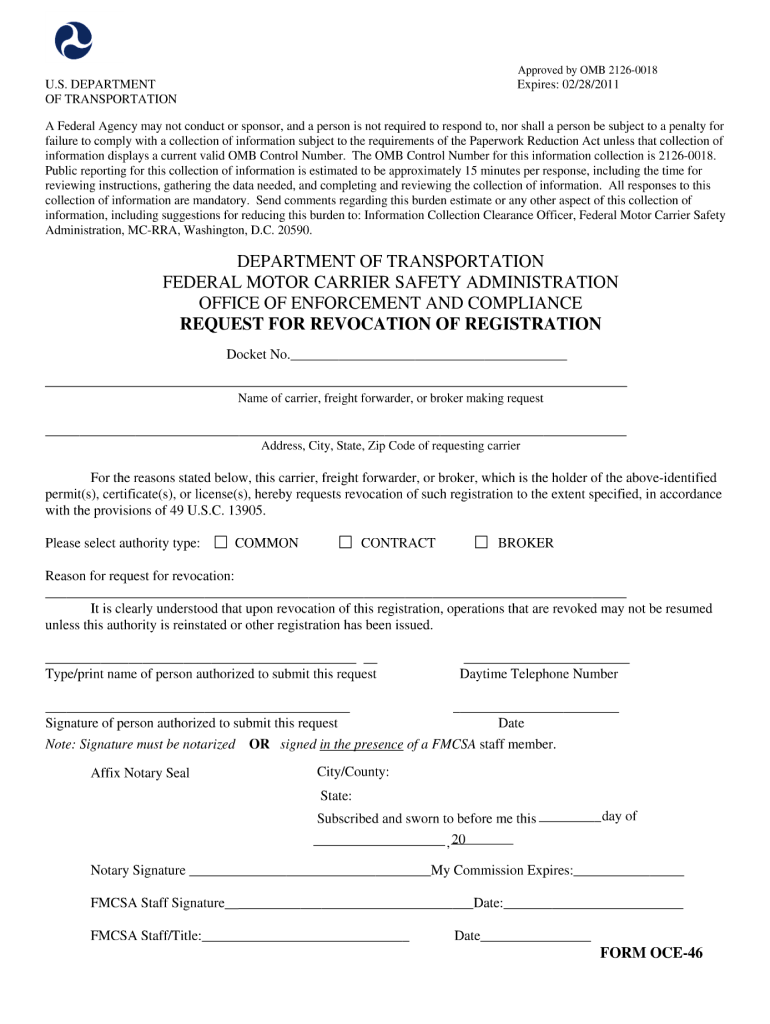
Approved by OMB 2126-0018 U.S. DEPARTMENT OF TRANSPORTATION Expires: 02/28/2011 A Federal Agency may not conduct or sponsor, and a person is not required to respond to, nor shall a person be subject.

Open form follow the instructions

Easily sign the form with your finger

Send filled & signed form or save
How to fill out the FMCSA OCE-46 online
The FMCSA OCE-46 form is essential for certain regulatory requirements. This guide provides a clear, step-by-step approach to help you successfully complete the form online.
Follow the steps to ensure a complete and accurate submission.
- Click ‘Get Form’ button to obtain the form and open it in the platform.
- Review the overview section. Familiarize yourself with the purpose of this form and understand the information you will need to provide.
- Fill in your personal information. Ensure that you enter your full name, contact details, and any relevant identification numbers correctly.
- Complete the section related to business details. If applicable, include the name and address of your organization and the nature of your business operations.
- Provide information regarding the specific service or operation that the form addresses. Be as detailed as possible to avoid any ambiguity.
- Review any additional sections or questions that may pertain specifically to your situation. Make sure you answer all questions thoroughly.
- After completing the form, review all the information you have entered for accuracy and completeness.
- Once you are satisfied with your entries, you can save your changes. You also have the option to download, print, or share the completed form as needed.
Complete your forms online today for a smoother submission process.
Experience a faster way to fill out and sign forms on the web. Access the most extensive library of templates available.
Related content
Jan 18, 2024 — The attached Form OCE-46,. Request for Revocation of Authority Granted...
by R Van Loo · 2019 · Cited by 193 — Professor Nou does not mention regulatory...
Get answers to your most pressing questions about US Legal Forms API.
How to complete form oce-46?
Completing form FMCSA OCE-46 requires specific information, including your USDOT number, MC/MX number, and the reason for revocation. Be sure to follow the instructions carefully and include all required signatures. Using a platform like US Legal Forms can simplify this process, giving you access to templates and guidance to ensure your form is filled out correctly.
Can I put my operating authority on hold?
Currently, the FMCSA does not offer a direct way to put operating authority on hold. If you need to stop operations temporarily, revoking your authority with the FMCSA OCE-46 form may be the necessary step. However, it is advisable to check with the FMCSA or legal experts for any updates or options. Utilizing US Legal Forms can provide you with the necessary tools and guidance during this process.
What is a voluntary revocation?
A voluntary revocation is the process by which a carrier officially cancels their operating authority with the FMCSA. This action is typically taken when a business decides to cease operations or no longer requires its operating authority. Submitting the FMCSA OCE-46 form initiates this process and should be completed carefully to ensure compliance. You can find assistance with this form through services like US Legal Forms.
How to voluntarily revoke operating authority?
You can voluntarily revoke your operating authority by submitting the FMCSA OCE-46 form to the appropriate federal authorities. This form indicates that you no longer wish to operate under your current authority. It is important to complete the form accurately to ensure a smooth revocation process. Platforms such as US Legal Forms make the submission process straightforward and efficient.
How to fill out a form oce-46?
Filling out form FMCSA OCE-46 involves providing specific information about your operating authority and your request for revocation. You will need to include your MC number, the effective date of closure, and your signature. To ensure accuracy and compliance, consider using resources like US Legal Forms, which can guide you through the process thoroughly.
How do you voluntarily revoke operating authority?
To voluntarily revoke your operating authority, you need to submit form FMCSA OCE-46 to the Federal Motor Carrier Safety Administration. This form allows you to officially cancel your operating status with the FMCSA. Make sure to provide all required details accurately to avoid any processing delays. Utilizing a platform like US Legal Forms can assist you in filling out and submitting this form correctly.
How to download an MC letter?
Downloading an MC letter is a straightforward process. You can log into your FMCSA account and navigate to your records to find the letter. To simplify your paperwork and ensure everything is correct, USLegalForms can guide you through the necessary steps.
What is proof of authority in trucking?
Proof of authority in trucking is documentation that confirms your legal permission to operate as a commercial motor carrier. It usually includes your operating authority issued by the FMCSA. If you need to generate or secure these documents, consider using USLegalForms for support.
How do I get my FMCSA safety rating?
To obtain your FMCSA safety rating, check the FMCSA website for your company's safety performance history. This rating reflects your compliance with federal safety regulations. If you need help understanding your rating or improving it, USLegalForms offers valuable resources.
How long does it take to get DOT operating authority?
The time it takes to receive your DOT operating authority can vary. Typically, you can expect a response within 21 days after submitting your application. For faster processing, ensure your submission is complete and consider using USLegalForms for efficient support.
Use professional pre-built templates to fill in and sign documents online faster. Get access to thousands of forms.
If you believe that this page should be taken down, please follow our DMCA take down process here.
This form is available in several versions. Select the version you need from the drop-down list below.