Loading
Get Facility Public Relation Officer Registration Form. ?? ??? ????? ???? ? ...
How it works
-

Open form follow the instructions
-

Easily sign the form with your finger
-

Send filled & signed form or save
How to use or fill out the Facility Public Relation Officer Registration Form online
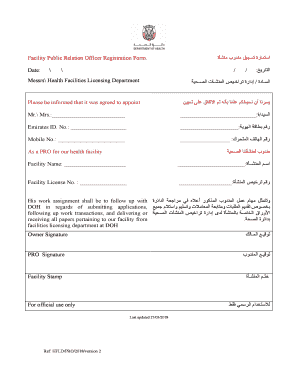
Completing the Facility Public Relation Officer Registration Form is a crucial step for health facilities to register their appointed Public Relation Officer (PRO). This guide will help users navigate through each section of the form effectively, ensuring all necessary information is accurately provided.
Follow the steps to successfully fill out the Facility Public Relation Officer Registration Form.
- Click ‘Get Form’ button to obtain the form and open it in the editor.
- Begin by entering the name of the individual who will serve as the PRO in the designated field, showing utmost clarity and confirming their role.
- Input the Emirates ID number of the PRO in the provided space. Ensure that the number entered is correct to avoid any processing delays.
- Enter the mobile number of the PRO. This should be a contact number where they can be reached for any updates or inquiries.
- Fill in the name of the health facility where the PRO will be appointed. Make sure the name matches the official documentation of the facility.
- Provide the facility license number. This information is vital for the validation of the facility’s registration and compliance with health regulations.
- In the section regarding the responsibilities of thePRO, ensure the duties are clearly stated, particularly in relation to the Department of Health (DOH) and paperwork handling.
- Finally, ensure both the owner's signature and the PRO's signature are added. Apply the facility stamp in the designated area to finalize the document.
- Once all necessary fields are completed, proceed to review the form for accuracy. You may now save changes, download, print, or share the completed form as required.
Ensure your health facility's PRO registration is complete by filling out the form online today.